Shift Differential Calculator
Estimate premium pay for evening, night, weekend, and on-call time, then compare base-only overtime with a blended regular-rate overtime calculation.
Presets are editable examples. They assume the entered premium categories can stack when the same hour qualifies for more than one differential.
Use hours that earn an evening premium.
This calculator adds all entered differential buckets. If your policy pays only one premium per hour, enter only the winning category or reduce overlapping hours.
| Pay code | Common trigger | Typical setup | Formula used here | Regular-rate treatment |
|---|---|---|---|---|
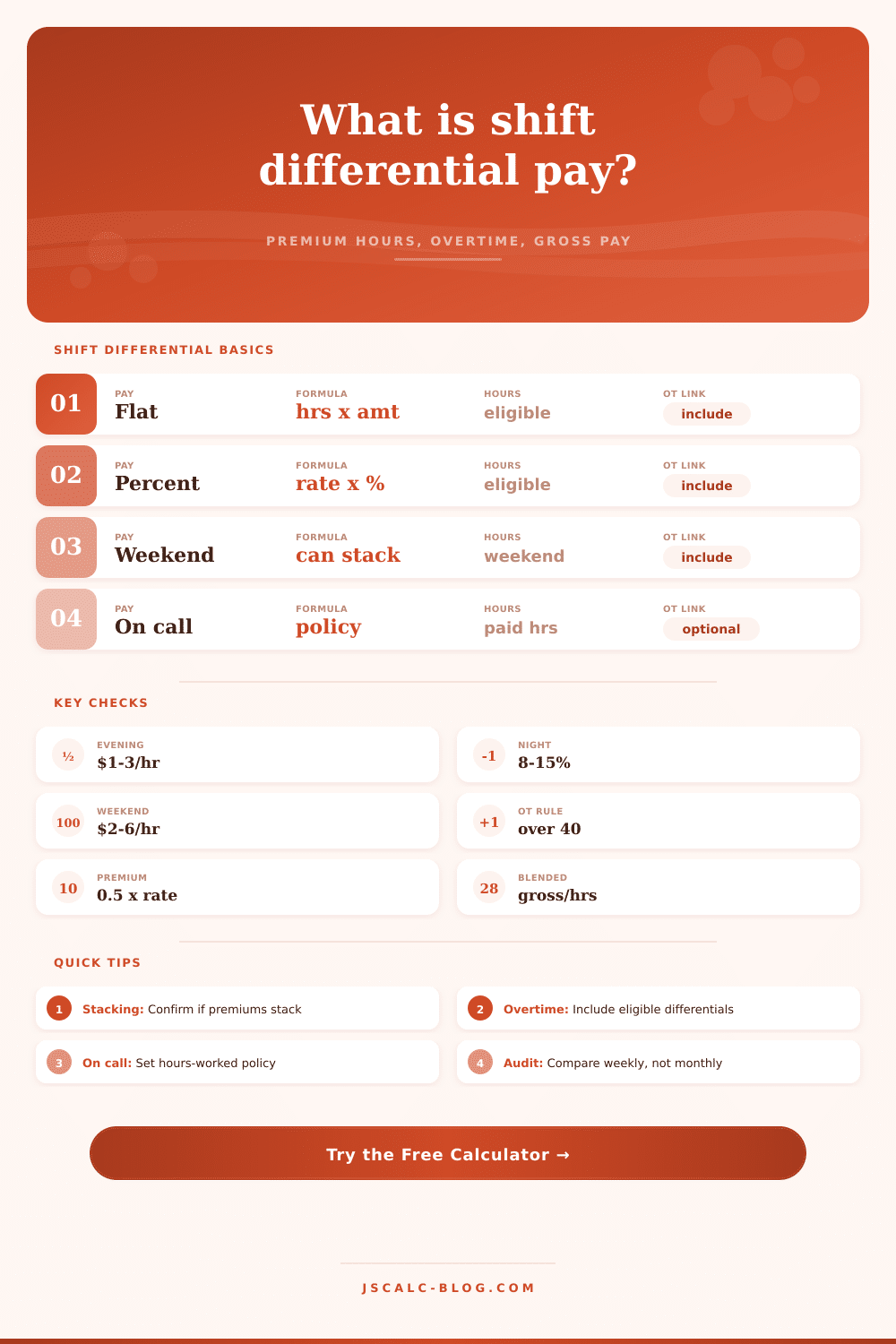
| Evening | Late afternoon or second shift | $1 to $3 per hour | eligible hours x flat amount | Usually included when earned for hours worked |
| Night | Third shift or overnight window | 8% to 15% of base | eligible hours x base rate x percent | Usually included when earned for hours worked |
| Weekend | Saturday, Sunday, or rest day | $2 to $6 per hour | eligible hours x premium | Often included if it is compensation for work |
| On-call | Standby or restricted response time | Flat hourly stipend | paid on-call hours x premium | Policy dependent; toggle included or excluded |
| Holiday | Holiday schedule | 1.5x, 2x, or fixed premium | model as weekend or custom premium | Depends on pay design and local policy |
| Work pattern | Premium style | Example entry | When it matters | Calculator handling |
|---|---|---|---|---|
| Second shift | Flat amount | $2.00/hr | Predictable evening coverage | Enter evening hours and flat value |
| Third shift | Percent of base | 10% | Higher base rates should scale premium | Enter night hours and percent value |
| Weekend coverage | Flat amount | $4.00/hr | Premium can stack with night hours | Enter weekend hours separately |
| On-call standby | Flat amount | $3.00/hr | Standby may or may not be hours worked | Use on-call toggles for treatment |
| Rotating schedule | Mixed | $1.50 + 8% | Multiple premiums in same workweek | Use all relevant premium buckets |
| Weekly setup | Base pay | Differential | Blended rate effect | Why it changes gross |
|---|---|---|---|---|
| 40 regular, 0 OT | Base x 40 | Added to straight pay | No OT premium | Gross increases by differential only |
| 40 regular, 8 OT | Base x 48 | Included in regular rate | 0.5 x blended x 8 | Premium dollars raise half-time OT |
| 32 regular, 12 OT | Base x 44 | Weekend can stack | Average spread over 44 hours | OT premium follows average weekly rate |
| 36 regular, 4 OT, on-call | Base x worked hours | On-call by policy | Toggle included or excluded | Standby treatment can change the divisor |
This calculator estimates payroll math from the inputs you provide. It is not tax, legal, or payroll compliance advice; use your employer policy, union contract, and applicable wage rules for final payroll.
Shift Differentials: Extra Pay for Working While the Rest of the World Sleeps
The extra dollars is called shift differentials. The idea is they’ll help close the gap between what you earned and what sits in your bank account.
How Shift Pay Changes Your Overtime
But knowing how to calculate these right isn’t as simple as tacking on an extra line item in your spreadsheet, you need to understand how these premiums tie into overtime, because this is where most folks makes mistakes or miss out on money at payroll time.
After entering your base rate and eligible hours, the calculator does all the math for you.
Most people forget that there’s a difference between straight-time premium and the overtime multiplier. Generally speaking, when you’re paid for working overtime, employer has to use regular rate of pay as basis for calculating the overtime premium.
The regular rate isn’t merely your base hourly wage; it also includes any shift differential, attendance bonus or other type of non-discretionary payment. In other words: If you get additional bucks for working a night shift, they don’t simply go into your pocket. They increases the base amount upon which your time-and-a-half is calculated.
A larger regular rate results in a larger overtime premium. And that can make a big difference if you regularly exceed 40 hours per week.
For example: what’s the difference between a percentage-based versus flat dollar premium? In a flat rate, you get X dollars no matter what your base pay is. Percentage rates scales with your base wage; the higher your base wage, the more you’ll get from the same percentage.
You can switch back and forth between these two models with this tool and observe how it works based off your own compensation structure. The percentage model will reward you with a bigger differential as you increase your base wage. The flat model won’t.
New hires may prefer the comfort of a fixed amount, while more experienced staffers pushes for percentage-based differentials. It all comes down to where you are in the wage spectrum and how much you expect your base pay to increases.
There are also weekend premiums. Many employers stacks weekend premiums on top of their night shift bonus, resulting in a worker being paid a night differential plus a weekend differential (plus possibly overtime at that time). That’s some pretty strong stacking power, but it is also difficult to track without a calculator.
For example, if you’re working a night shift Saturday and work more than eight hours, every hour after eight triggers overtime. Both the weekend AND the night premiums gets factored into the regular rate for all those overtime hours. Both the weekend AND the night premiums get factored in the regular rate for all those overtime hours.
The reference table in the tool details the most common triggers; just make sure you check it against your own shift pattern to see what premiums may be owed for that type of shift.
Does your company permit the stacking of premiums? Or do they only pay highest one? By default, the calculator treats it as stacked premiums, but tweak settings if your employer doesn’t permit it.
There are also some variables with on-call pay. Depending on who you work for, they may include on-call time as an hour worked. This increase the number of hours in the divisor and decreases the blended hourly rate. Or maybe they provide a flat stipend for on-call time that is not included when calculating regular rate. That will affect your final gross pay amount.
Check your employment contract to see what on-call time is considered. The calculator has a toggle for this so you can play around with these two scenarios side-by-side. It’s a nice way to get an idea about how much you’ll earn during a week where you’re called back compared to a week without a call-back.
The reason most people screw up their pay is they think shift diff’s are extra money on top of the base wage. But once you realize they’re a component of the hourly wage, which then feeds into the overtime calculation; it all makes sense.
You want to know what an hour is worth within the context of the entire week. And once you have this, it’ll help you stop guessing at what’s coming with a schedule change, and instead understand exactly how it’ll affect you.
It’s that clarity that transforms a confusing paycheck into a clear budget, one where you get paid fairaly for every single minute you clock.