Time To Transfer Data Calculator
Work out how long a file takes to move over any connection. Enter a file size and a transfer speed, pick decimal or binary units, add a real-world overhead factor, and get the time in days, hours, minutes, and seconds.
📂Real Transfer Presets
📝File And Speed Inputs
Real links lose 10 to 20% to headers and retries.
Handshake, seek, or login time added once.
🔢Formula Snapshot
📊Transfer Time By File Size
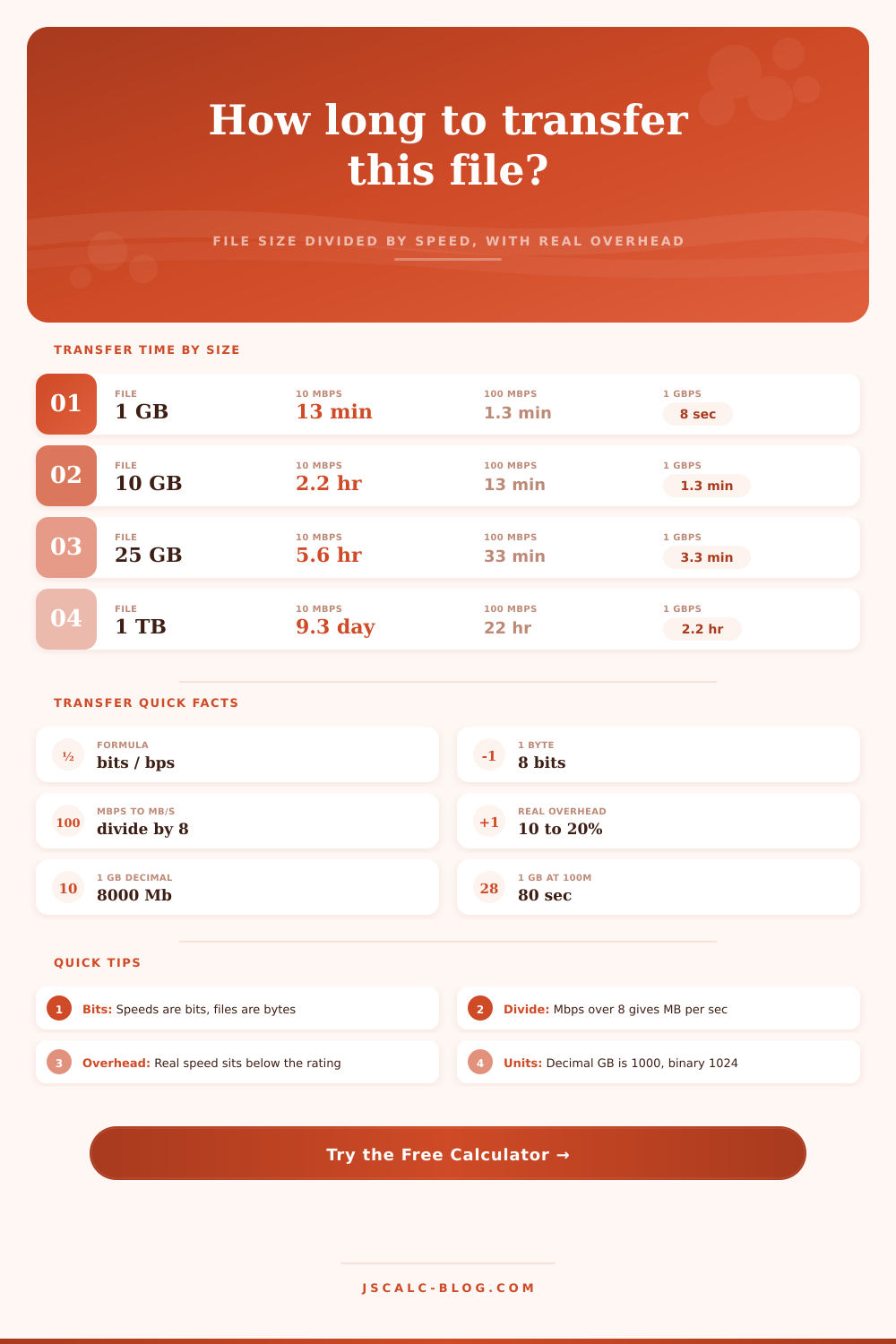
| File Size | 10 Mbps | 50 Mbps | 100 Mbps | 500 Mbps | 1 Gbps |
|---|---|---|---|---|---|
| 100 MB | 1m 20s | 16s | 8s | 1.6s | 0.8s |
| 500 MB | 6m 40s | 1m 20s | 40s | 8s | 4s |
| 1 GB | 13m 20s | 2m 40s | 1m 20s | 16s | 8s |
| 5 GB | 1h 6m | 13m 20s | 6m 40s | 1m 20s | 40s |
| 10 GB | 2h 13m | 26m 40s | 13m 20s | 2m 40s | 1m 20s |
| 25 GB | 5h 33m | 1h 6m | 33m 20s | 6m 40s | 3m 20s |
| 60 GB | 13h 20m | 2h 40m | 1h 20m | 16m | 8m |
| 1 TB | 9d 6h | 1d 20h | 22h 13m | 4h 27m | 2h 13m |
Ideal times at 100% efficiency using decimal sizes. Real transfers run 10 to 20% slower.
🗂Bits Versus Bytes Reference
| Rated Speed | Bits/sec | Bytes/sec | MB/s (dec) | 1 GB Ideal Time |
|---|---|---|---|---|
| 5 Mbps DSL | 5,000,000 | 625,000 | 0.625 | 26m 40s |
| 25 Mbps | 25,000,000 | 3,125,000 | 3.125 | 5m 20s |
| 100 Mbps | 100,000,000 | 12,500,000 | 12.5 | 1m 20s |
| 300 Mbps | 300,000,000 | 37,500,000 | 37.5 | 26.7s |
| 1 Gbps | 1,000,000,000 | 125,000,000 | 125 | 8s |
| 10 Gbps | 10,000,000,000 | 1,250,000,000 | 1,250 | 0.8s |
🔌USB And Network Real Speeds
| Interface | Rated | Typical Real | Real MB/s | Best For |
|---|---|---|---|---|
| USB 2.0 | 480 Mbps | ~280 Mbps | ~35 MB/s | Small drives |
| USB 3.0 / 3.2 G1 | 5 Gbps | ~3.2 Gbps | ~400 MB/s | SSD copies |
| USB 3.2 Gen 2 | 10 Gbps | ~7 Gbps | ~900 MB/s | NVMe drives |
| Gigabit Ethernet | 1 Gbps | ~940 Mbps | ~112 MB/s | LAN transfer |
| Wi-Fi 6 (5 GHz) | 1.2 Gbps | ~600 Mbps | ~75 MB/s | Wireless |
| SATA III SSD | 6 Gbps | ~4.4 Gbps | ~550 MB/s | Disk clone |
⚙Full Formula Breakdown
📉Overhead Effect At 100 Mbps
| Overhead | Efficiency | Effective Mbps | Effective MB/s | 1 GB Time |
|---|---|---|---|---|
| 0% | 100% | 100 | 12.5 | 80.0s |
| 5% | 95% | 95 | 11.88 | 84.2s |
| 10% | 90% | 90 | 11.25 | 88.9s |
| 15% | 85% | 85 | 10.63 | 94.1s |
| 20% | 80% | 80 | 10.0 | 100.0s |
| 30% | 70% | 70 | 8.75 | 114.3s |
💡Practical Transfer Tips
So there you sit for 20 minutes, looking at a progress bar that’s hardly budged. “The file manager estimates another three hours,” you think. But last week, that same movie download within an hour. Something doesn’t seem right, but what? Here’s where the disconnect arise between how computers measure storage and how internet providers sell speed.
If you have a plan that says it delivers one-hundred megabits per second, that sounds great… except that a byte isn’t a bit; files is measured in bytes. And there’s an eight-to-one ratio here, the first trap everyone fall into. Divide that number by eight to determine how quickly you’re downloading: twelve point five megabytes per second. Now it seem like wait won’t be too long.
Understanding File Transfer Speeds
You don’t need to keep one of those in your head as you’re waiting for a big backup or game to complete, this page’s tool do it for you automatically. It uses your connection speed and file size, runs the required bit-to-byte calculations, and throws some extra bits on there for protocol overhead. This is what trips up most estimates; they expects perfect network conditions.
In reality, networks gets messy. Disk seeks, Wi-Fi interference, TCP handshakes, packet acks, and so on can all gobble up your theoretical maximum transfer rate. The calculator also has a slider for overhead, because if you don’t account off these factors, you will be frustrated when your real-world transfer take longer then expected.
Take that terabyte backup through a gigabit fiber connection. In theory, it will took slightly more than two hours over one gigabit per second. Of course, there’s no accounting for the network being congested or servers having their own limits that slow everything down.
The reference tables (found nearby) provides an idea of the best-case scenarios for different speeds. While they don’t show full picture, they can help give you an idea of how much faster things go with fiber versus DSL. However, they don’t indicate whether or not your neighbor happen to be uploading four simultaneous stream of 4K video at the same time you’re uploading photos.
Another seemingly inconsequential option: whether you specify units in decimal vs. It uses binary form. Decimal gigabytes consist of one billion bytes, which is how most internet plans are described. But your computer probably displays file sizes in terms off binary gibibytes (base one thousand twenty-four). When it’s just one photo, this doesn’t seem like a big deal; but if you’re working with multi-terabyte data sets, it accumulate into minutes, or even hours! By setting the calculator to match the system you’re running on, the little thing don’t accumulate to become major timing issues.
Finally, note that remote transfers is different than local transfers. A gigabyte of video moving from your external hard drive into your laptop over a USB 3.0 may go several times faster than your typical home internet connection. That difference between them is highlighted nicely by the interface specs on the page, it demonstrate how fast a sata ssd or NVMe drive can saturate a cable within seconds.
If you want to know what’s controlling your transfer speed, then you’ll have some insight into whether you should of upgraded to a faster internet plan, or just get better storage hardware. In the end, it’s not so much math as it is setting realistic expectations.
If you’re waiting to sync your cloud backups before a trip, know how many bits and bytes you has to worry about, and that’ll help you decide if you want to do it over WiFi or a wired connection; or when would of best to download a massive patch for that new video game. Are you downloading something big in the middle of the night? Or while your computer’s charging? The math will run itself up there (with our calculator), leaving you free to think through the logistics. That uncertain wait becomes a real wait, one you’ll actualy trust.