RAID 1 Capacity Calculator
Size a RAID 1 mirror set in seconds. Enter how many drives share the mirror, each drive size, and the drive type, and this tool returns usable capacity (the smallest drive), 1/n capacity efficiency, the number of mirrored copies, aggregate read throughput with read balancing, and the n minus 1 drives that can fail while the array stays online.
🔁Real Mirror Presets
💾Mirror Configuration
Every drive holds a full identical copy of the data.
Size of one member drive before mirroring.
Unit for the per-drive capacity above.
Mirror is limited to the smallest member. Set equal to per-drive for matched drives.
Sustained sequential read speed of a single drive.
Balancing lets parallel reads scale toward n x single-drive speed.
Metadata and format loss subtracted from usable space, typically 1 to 5%.
Extra idle drives that auto-rebuild a failed mirror. They add no usable space.
🔢RAID 1 Snapshot
📋Mirror Width to Usable Capacity
| Mirror Width | Per Drive | Raw Total | Usable | Efficiency |
|---|---|---|---|---|
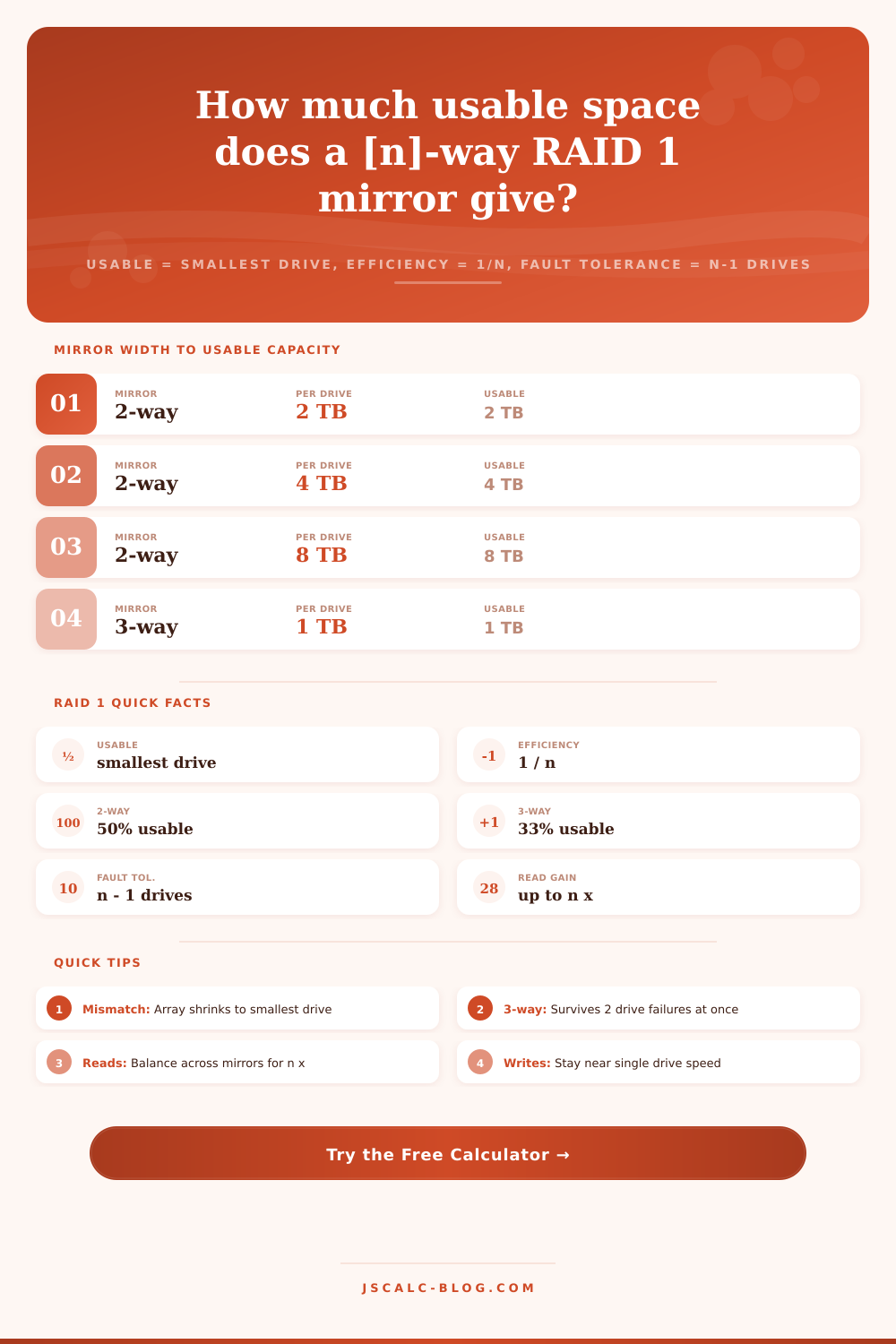
| 2-way | 2 TB | 4 TB | 2 TB | 50% |
| 2-way | 4 TB | 8 TB | 4 TB | 50% |
| 2-way | 8 TB | 16 TB | 8 TB | 50% |
| 3-way | 1 TB | 3 TB | 1 TB | 33% |
| 3-way | 4 TB | 12 TB | 4 TB | 33% |
| 3-way | 6 TB | 18 TB | 6 TB | 33% |
| 4-way | 2 TB | 8 TB | 2 TB | 25% |
| 4-way | 8 TB | 32 TB | 8 TB | 25% |
⚡Read Speed by Drive Type and Mirror Width
| Drive Type | 1 Drive | 2-Way Read | 3-Way Read | Write Speed |
|---|---|---|---|---|
| 5400 RPM HDD | 120 MB/s | 240 MB/s | 360 MB/s | ~120 MB/s |
| 7200 RPM HDD | 180 MB/s | 360 MB/s | 540 MB/s | ~180 MB/s |
| SATA SSD | 550 MB/s | 1100 MB/s | 1650 MB/s | ~550 MB/s |
| NVMe SSD | 3500 MB/s | 7000 MB/s | 10500 MB/s | ~3500 MB/s |
🛡Mirrored Copies and Fault Tolerance
| Mirror Width | Copies of Data | Drives to Fail | Copies Left | Rebuild From |
|---|---|---|---|---|
| 2-way | 2 copies | 1 drive | 1 copy | surviving mirror |
| 3-way | 3 copies | 2 drives | 1 copy | any live mirror |
| 4-way | 4 copies | 3 drives | 1 copy | any live mirror |
🗃RAID Level Comparison Grid
| RAID Level | Capacity Efficiency | Min Drives | Fault Tolerance | Read Gain | Write Penalty |
|---|---|---|---|---|---|
| RAID 0 | 100% | 2 | 0 drives | n x | None |
| RAID 1 (2-way) | 50% | 2 | 1 drive | up to n x | Mirror all writes |
| RAID 1 (3-way) | 33% | 3 | 2 drives | up to n x | Mirror all writes |
| RAID 5 | (n-1)/n | 3 | 1 drive | (n-1) x | Read-modify-write |
| RAID 6 | (n-2)/n | 4 | 2 drives | (n-2) x | Double parity |
| RAID 10 | 50% | 4 | 1 per mirror | n x | Mirror + stripe |
⚙Formula Breakdown
💡RAID 1 Planning Tips
Raid 1 is a simple way to provide drive redundancy. It will mirror your data across disks. Each disk contain the same data. If any disk fails, all other drives still serve up your files without needing parity calculations or file reconstruction. That’s why RAID 1 works well in home labs where uptime is important but raw storage isn’t, or for boot volumes and critical databases.
To make that idea real, there’s a calculator on that page that lets you know exactly how much of your storage will be eaten by redundancy… And what speed gains you may get during reads.
How RAID 1 Works
A RAID 1 array has the controller write the same block across all member drives in parallel. If that’s a mirror with two drives, you have two copies. If it’s a three drive mirror, you have three. Those mirrored copies does not use extra space; they are just redundant copies. So your two 4 TB disks gets you only 4 TB of space. The second one is just a safety copy. That’s the trade-off for mirroring. You’re sacrificing raw capacity for immediate protection at the hardware level, and that’s a reasonable trade off if you can’t afford to lose any data.
It’s that simple as far as the core formula goes. The size of smallest drive in the set is the usable capacity. So adding another drive doesn’t make anything bigger it just makes multiple copies. That’s also why matched drives are such a big deal. You can have one 4 TB drive and one 6 TB drive but the array will be using only 4 TB per drive leaving 2 TB sitting there doing nothing. The tool lays it out right there for you with a separate field for the smallest drive. If you’re not using matching drives, you can put in the actual limiting size. This gives you an honest picture of what’s usable before you spend your money. Most people don’t realize that till after they buy.
RAID 1 is as efficient as 1/n where n is the number of disks. That means a two-drive RAID 1 is 50 percent efficient. Three-way mirror? 33 percent. Four-way? Just 25 percent. What’s that other space not doing? It’s not being lost, it’s being used for redundant data. Use the calculator to compare disk cost vs. This provides the actual capacity spent on mirrored copies and an efficiency percentage. This inefficiency is the largest downside to RAID 1 over parity-type schemes such as RAID 5 or 6.
There’s also a performance advantage to mirroring, specifically for reads. Because each drive contains an entire copy, the smart controller can service multiple read requests at once on multiple drives. If read balancing is enabled (it isn’t by default), total read performance approaches n x single-drive speed where n is the number of drives mirrored. For example, two SATA SSDs reading in parallel push towards 1100 MB/s. Writes are another matter. They need to be committed to all copies before they’re safe, meaning that sustained write speed never gets much above single-drive speed no matter how wide your mirror. You can toggle read balancing and select a drive type using the tool; the aggregate read will show next to the write ceiling, making the asymmetry clear.
Fault Tolerance Scales with Mirror Width The wider the mirror, the more fault tolerant it will be. As long as there’s at least one functional mirror in an array, the array remains functional even if up to n minus one drives fail. Thus, a two-way mirror protects against one failure. A three-way mirror protect against two simultaneous failures. And a four way mirror can lose three drives and recover all your files. So why wouldn’t you want a wide mirror for critical data?
A two-way mirror is fully redundant only until the first failure. Then, you are down to a single unprotected copy while rebuild runs. A three-way mirror leaves two copies after one drive fails. This gives you a comfy cushion during that vulnerable window.
Two practical inputs round out the model. The calculator takes into account a hot spare, an idle drive that the controller can pull in and begin rebuilding a mirror instantly when a member fails. That’s not adding any usable capacity but does shorten the exposure window, so it’s counted separately. File system overhead is a small amount of space (typically between one and five percent) that gets lost to formatting, journals and metadata. Enter a reasonable value for this and you get the net usable figure, what your operating system will say it has, instead of the rounded up marketing number printed on the drive label.
On the far side of the redundancy spectrum is RAID 1: zero fault tolerance (RAID 0 stripes for max speed), or RAID 1 mirrors for simplicity & rebuild safety. RAID 5/6 offers better efficiency and failure tolerance. It uses parity but pays a penalty during writes because data must be written and then read back to compute parity. RAID 1 has no such penalty since it’s a simple copy; rebuilds are also safer/faster.
Create a starting point based on your plan, adjust the drive size and count to fit your hardware, and see how much usable capacity you lose. Parity builds will expand further, particularly for bulk storage. Mirrors-only are the safe choice when you need the system to stay running. Let the calculator do the math in seconds and make a fact-based decision, not a guesswork one.