Nit Brightness Calculator
Convert luminance between nits (cd/m²), foot-lamberts and apostilbs, or switch to projector mode to turn lumens, screen gain and screen size into real on-screen brightness. Every result is ranked against SDR and HDR tiers and the SMPTE 16 fL cinema target so you know exactly how bright your display or projector actually is.
🔆Choose a Mode
🎯Real Display & Projector Presets
📝Luminance Inputs
The brightness number you want to convert.
Unit of the value entered above.
Measured light output of the projector.
Reflectivity of the screen; 1.0 is a neutral matte white.
Diagonal size of the projected image.
Shape of the screen, used to find its area.
Sets the on-screen brightness target to aim for.
Controls rounding on every result card.
🔢Conversion Snapshot
📐Luminance Unit Conversions
| Unit | Symbol | Equals in Nits | Note |
|---|---|---|---|
| Nit | cd/m² | 1 nit | SI luminance base |
| Foot-lambert | fL | 3.426 nits | 1 fL = 3.426 cd/m² |
| Apostilb | asb | 0.3183 nits | 1 nit = π apostilbs |
| Candela per ft² | cd/ft² | 10.76 nits | Also 3.426 fL |
| Stilb | sb | 10000 nits | 1 cd/cm² |
| Lambert | L | 3183 nits | Older CGS unit |
| Millilambert | mL | 3.183 nits | Close to 1 fL |
📺HDR and SDR Tier Thresholds
| Tier | Peak Nits | Foot-Lamberts | Typical Use |
|---|---|---|---|
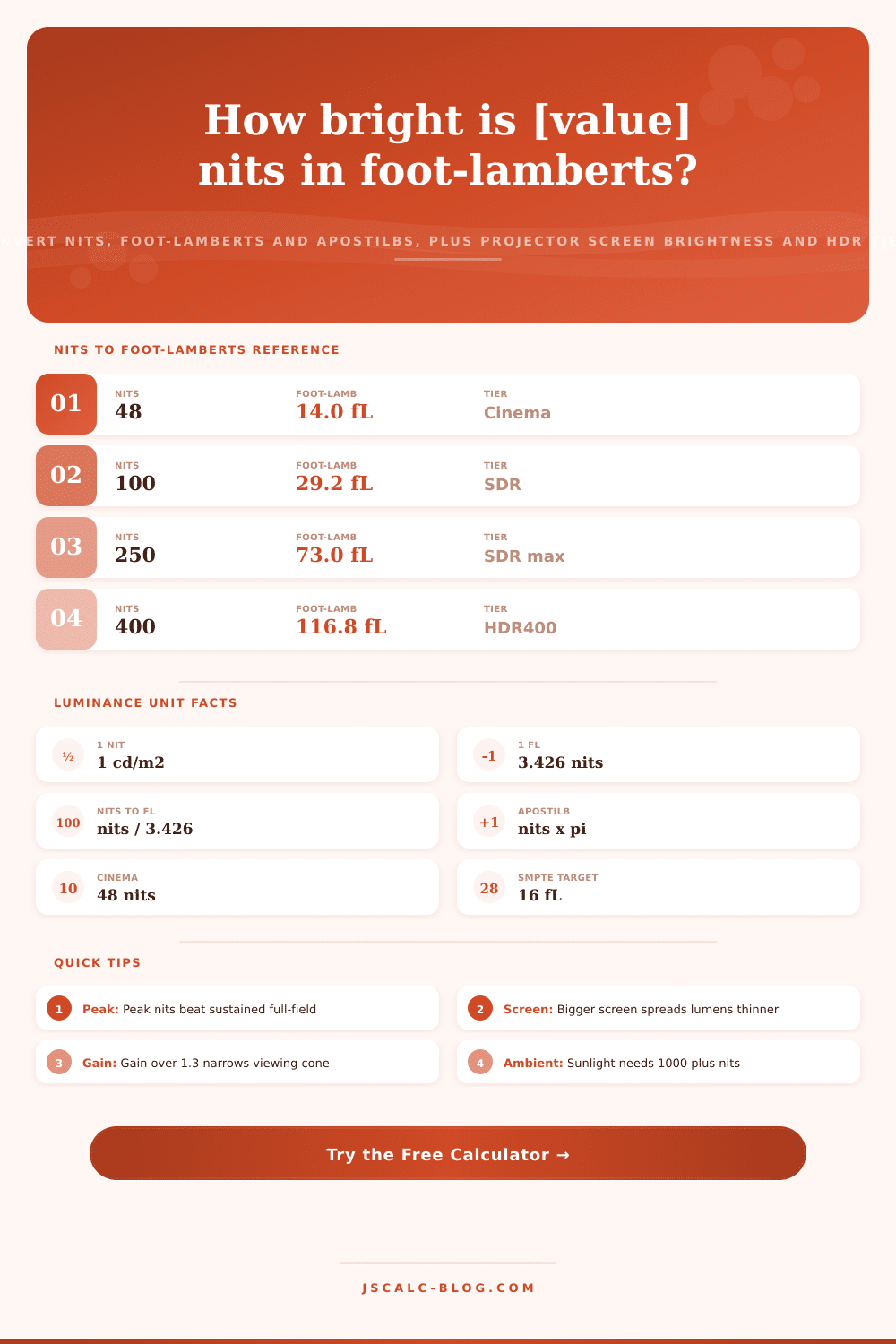
| Cinema (DCI) | 48 nits | 14.0 fL | Dark theater screen |
| SDR baseline | 100 nits | 29.2 fL | Reference SDR white |
| SDR bright | 250 nits | 73.0 fL | Typical living-room TV |
| HDR400 | 400 nits | 116.8 fL | Entry HDR displays |
| HDR600 | 600 nits | 175.1 fL | Mid HDR monitors |
| HDR1000 | 1000 nits | 291.9 fL | Premium HDR TVs |
| HDR1400 | 1400 nits | 408.6 fL | High-end mini-LED |
| Mastering | 4000 nits | 1167 fL | Studio grading monitors |
| PQ peak | 10000 nits | 2919 fL | Format ceiling |
🎥Projector Brightness Targets
| Environment | Target fL | Target Nits | Guidance |
|---|---|---|---|
| Dedicated cinema | 12-16 fL | 41-55 nits | SMPTE calibrated dark room |
| Dim living room | 16-25 fL | 55-86 nits | Some controlled ambient |
| Moderate ambient | 25-40 fL | 86-137 nits | Lamps on, blinds closed |
| Bright / daytime | 40-60 fL | 137-206 nits | Needs high lumens or ALR |
| HDR projection | 50-100 fL | 171-343 nits | Small bright screen helps |
🗃Device and Scene Brightness Comparison Grid
| Device / Scene | Typical Nits | Foot-Lamberts | Tier | Best Use | Notes |
|---|---|---|---|---|---|
| E-reader (front-lit) | 25 nits | 7.3 fL | Low | Night reading | Reflective panel |
| Cinema projector | 48 nits | 14.0 fL | Cinema | Dark theater | DCI standard |
| Office monitor | 200 nits | 58.4 fL | SDR | Indoor desk work | Ergonomic default |
| Laptop screen | 300 nits | 87.6 fL | SDR | Mixed lighting | Typical max |
| OLED TV | 700 nits | 204.3 fL | HDR600 | Living room HDR | Great contrast |
| Phone outdoors | 800 nits | 233.5 fL | HDR peak | Sunlight viewing | Auto-boost mode |
| Mini-LED TV | 1000 nits | 291.9 fL | HDR1000 | Bright-room HDR | Local dimming |
| Grading monitor | 4000 nits | 1167 fL | Mastering | Studio color | Reference class |
| Overcast sky | 2000 nits | 583.8 fL | Scene | Real-world ref | Diffuse daylight |
| Direct sunlight | 1.6 billion | 467M fL | Scene | Never look at | Sun disc surface |
⚙Formula Breakdown
💡Brightness Setup Tips
JSCalc-Blog.com has a Nit Brightness Calculator that gets into absolute luminance (how much light a given display is putting out towards your eyeballs). Unlike other calculators, it allow you to switch between nits (the unit people actualy use), foot-lamberts, and apostilbs, all of which describe that same quantity. It will also take a lumen rating for a projector and tell you what actual brightness they puts out on a given screen size. There is also a contrast tool that compares the relative value of black to white, but it answer a slightly different question: how many nits is this image and will it be bright enough?
One candela per square meter is known as a nit (or, formally, 1 cd/m²). This is the unit number that you see on your monitor’s specs, your TV’s specs, your phone’s specs… Every screen. If something say it’s at 1000 nits, what that means is that this thing can produce 1000 candela of luminous intensity per square meter of display. Since the nit is an SI unit, it act as the anchor for calculating all these numbers. All of the values you put into the calculator will be translated into nits, and expressed back out in the unit of your choice.
How to Use the Brightness Calculator
Your laptop has about 300? That’s pretty bright. A nice oled tv might have 700? Bright. And your fancy-pants HDR set flashes 1000 nits (or higher) on a tiny highlight, because it needs to.
Cinema and projector engineers tend not to talk in nits. Instead they will talk in foot lamberts, one of those old units of measurement linked to the amount of reflected light off a screen. One foot-lambert is equal to 3.426 nits. So if you want to convert from foot-lamberts to nits, multiply by 3.426. Divide by 3.426, or multiply by 0.2919, to convert back.
For example, the well-known SMPTE calibration standard for a cinema is typically given as being around 14 to 16 foot-lamberts on-screen. That converts to approximately 48 to 55 nits. This is perfectly reasonable for a dark theater but very dim compared to a living room television. Both figures are given in the calculator, so you don’t have to remember the conversion factor.
The third unit that completes the trifecta is the apostilb. This relates to the nit via pi. (That’s right, one nit = pi apostilbs.) So for example, you multiply nits by approximately 3.1416 to obtain apostilbs, and vice versa. You’ll see apostilbs in some older perimetry and lighting literature. The calculator treats apostilbs as a first class source unit along with nits and foot-lamberts. There are also cousins such as the candela per square foot, the lambert, and the stilb present in the reference tables. That way if you happen across an unfamiliar unit in a datasheet, you can still plot that unit on current day nit scale.
This is projector mode. This is where the most power lies. Lumens (total light output) are a rating for projectors. How well that light covers the screen is what determines what you actually get. Lumen x Screen Gain / Square Feet of Screen Area = screen brightness. The calculator finds the screen area based off its diagonal and its aspect ratio. It divides the diagonal down to width and height, then multiplies them together and converts it from square inches to square feet.
For example, 120 inch 16:9 screen with 3000 lumens and a 1.0 gain = approximately 48 square feet of area. This yields approximately 62 foot-lamberts, or about 213 nits. This is comfortaly above the cinema target, which is exactly the sort of thing the tool was designed to reveal. This is exactly the sort of thing the tool was designed to reveal.
Screen size wins because onscreen brightness divided by area. Diagonal doubles mean almost four times the area. A great looking image on a 100-inch screen drop below the 16 foot-lambert cinema standard when stretched beyond 150 inches. Gain has an opposite effect, bouncing more light back towards the center seats. But gain above 1.3 starts shrinking the comfortable viewing cone; may even create hotspots. Dial in screen size, gain and aspect ratio with the calculator. Then it’ll tell you what combo gets you a bright picture while not compromising uniformity. It also shows how it compares to the target level of ambient light in your room. It assigns each outcome to a brightness tier as well.
SDR aims for about 100 nits of reference white, while standard living room TVs can be brighter, around 250 nits. Higher peaks define high dynamic range. Certifications like HDR400, HDR600, HDR1000 and HDR1400 correspond to their respective nit numbers. Studio mastering monitors can reach up to 4000 nits, while the underlying PQ signal format caps at nearly 10000. Whatever number you type into the calculator, it categorizes it into the corresponding tier. It cautions that these numbers are peak values. You might find a display capable of 1000 nits on a small window but only 300 to 600 nits on a full white field. Both values are relevant when comparing screens.
With just one click, ten presets load real-world situations. These presets range from an OLED at 700 nits to an SDR TV at 250, a home theater at 3000 lumens, a 16:10 classroom projector screen, and all the way up to a gain screen in a bright room that requires 4500 lumens. Each loads into the form and calculates immediately. Adjust it from there, start from somewhere close to your situation.
The calculator takes the focus off of relative numbers and puts it onto absolute luminance. Whether you’re calibrating a projector, looking to buy a display, or trying to understand the numbers on two spec sheets, this tool provides reliable conversions and estimats screen brightness within seconds.