Network Address Calculator
Find the network (subnet) address of any IPv4 host by ANDing the address bit for bit with its subnet mask. Enter the four octets and a CIDR prefix or dotted mask to get the network ID, the mask used, the address class, and whether the host is private, public, loopback, APIPA, or reserved.
🎯Real Address Presets
📝Address Inputs
The host address you want to resolve to its network ID.
Choose how you supply the subnet mask below.
Number of leading 1 bits in the mask.
The tool converts this to a prefix automatically.
Displays the bit-by-bit AND of IP and mask.
Detects class A to E and RFC 1918 or reserved use.
🔢Quick Reference Snapshot
📊Worked Bitwise AND Example
| Octet | IP 192.168.1.77 | Mask 255.255.255.0 | AND Result |
|---|---|---|---|
| 1st | 11000000 (192) | 11111111 (255) | 11000000 (192) |
| 2nd | 10101000 (168) | 11111111 (255) | 10101000 (168) |
| 3rd | 00000001 (1) | 11111111 (255) | 00000001 (1) |
| 4th | 01001101 (77) | 00000000 (0) | 00000000 (0) |
| ID | Host portion cleared | Zero bits mask host | 192.168.1.0 |
📋Class Default Masks and Ranges
| Class | First Octet | Leading Bits | Default Mask | Default Prefix |
|---|---|---|---|---|
| Class A | 1 to 126 | 0xxxxxxx | 255.0.0.0 | /8 |
| Class B | 128 to 191 | 10xxxxxx | 255.255.0.0 | /16 |
| Class C | 192 to 223 | 110xxxxx | 255.255.255.0 | /24 |
| Class D | 224 to 239 | 1110xxxx | Multicast, no mask | n/a |
| Class E | 240 to 255 | 1111xxxx | Experimental | n/a |
| Loopback | 127 | Reserved | 255.0.0.0 | /8 |
🔑Private and Special-Use Blocks
| Block | Range | Prefix | Purpose | Routable on Internet |
|---|---|---|---|---|
| 10.0.0.0 | 10.0.0.0 - 10.255.255.255 | /8 | Private class A (RFC 1918) | No |
| 172.16.0.0 | 172.16.0.0 - 172.31.255.255 | /12 | Private class B (RFC 1918) | No |
| 192.168.0.0 | 192.168.0.0 - 192.168.255.255 | /16 | Private class C (RFC 1918) | No |
| 127.0.0.0 | 127.0.0.0 - 127.255.255.255 | /8 | Loopback (localhost) | No |
| 169.254.0.0 | 169.254.0.0 - 169.254.255.255 | /16 | APIPA link-local, no DHCP | No |
| 100.64.0.0 | 100.64.0.0 - 100.127.255.255 | /10 | Carrier-grade NAT (RFC 6598) | No |
| 224.0.0.0 | 224.0.0.0 - 239.255.255.255 | /4 | Multicast (class D) | Special |
🗃Address Type Comparison Grid
| Block | Range | Class | Primary Use | Routable | Example Host |
|---|---|---|---|---|---|
| 10.0.0.0/8 | 10.0.0.0 - 10.255.255.255 | A | Large private LAN | No | 10.20.30.40 |
| 172.16.0.0/12 | 172.16.0.0 - 172.31.255.255 | B | Mid private LAN | No | 172.16.5.9 |
| 192.168.0.0/16 | 192.168.0.0 - 192.168.255.255 | C | Home and SOHO LAN | No | 192.168.1.77 |
| 100.64.0.0/10 | 100.64.0.0 - 100.127.255.255 | A | Carrier CGNAT | No | 100.64.7.3 |
| 169.254.0.0/16 | 169.254.0.0 - 169.254.255.255 | B | Link-local APIPA | No | 169.254.9.9 |
| 127.0.0.0/8 | 127.0.0.0 - 127.255.255.255 | A | Loopback localhost | No | 127.0.0.1 |
| 203.0.113.0/24 | 203.0.113.0 - 203.0.113.255 | C | Documentation (RFC 5737) | No | 203.0.113.65 |
| 224.0.0.0/4 | 224.0.0.0 - 239.255.255.255 | D | Multicast groups | Special | 224.0.0.5 |
| 8.0.0.0/8 | 8.0.0.0 - 8.255.255.255 | A | Public unicast | Yes | 8.8.8.8 |
| 203.0.114.0/24 | Sample public /24 | C | Public unicast | Yes | 203.0.114.20 |
⚙Formula Breakdown
💡Subnetting Tips
The secret identity of each IPv4 address are used by routers to route through Internet. What you’re seeing are those addresses as dotted decimals on a computer screen. But the identity itself isn’t obvious.
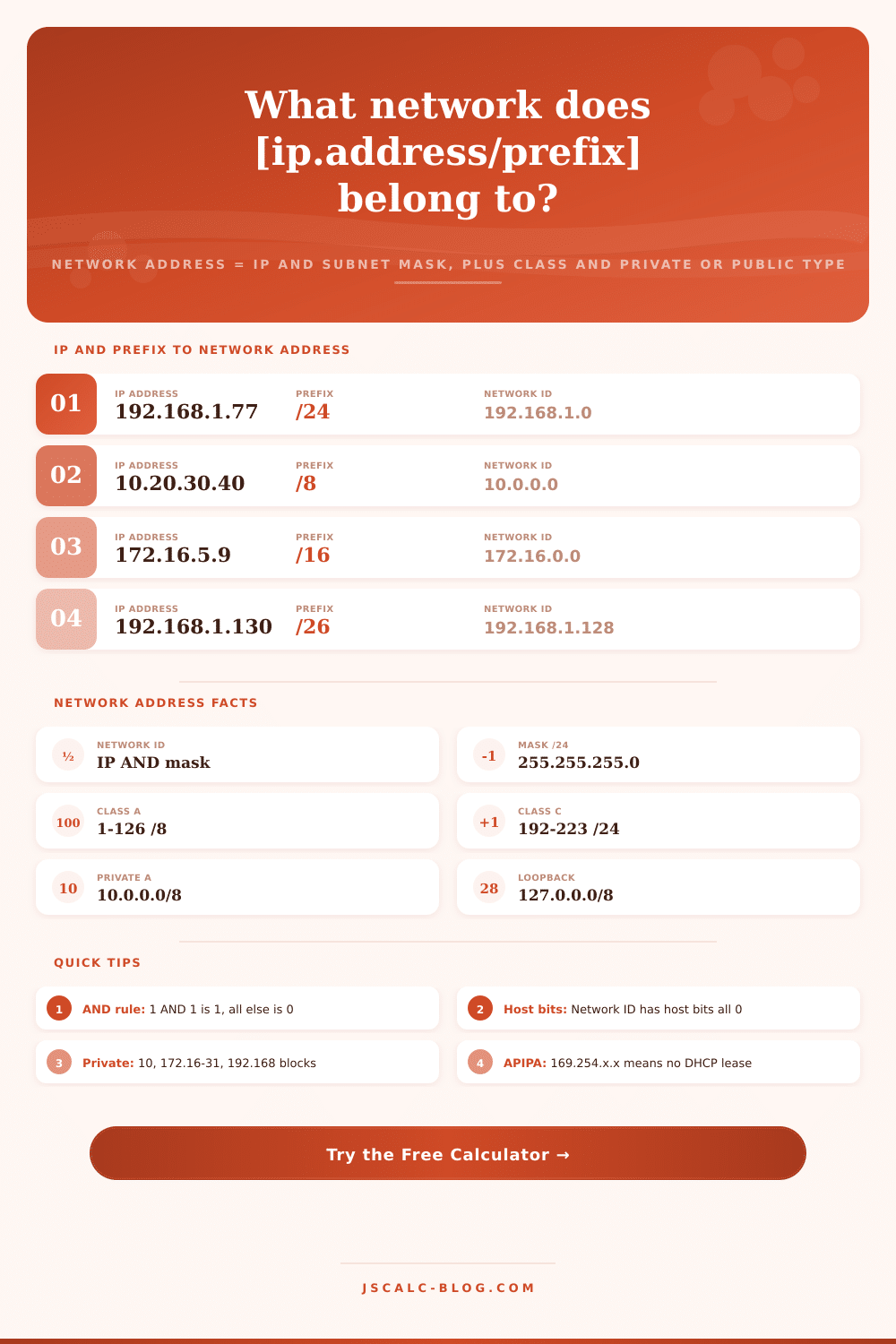
The calculator above displays precise operation performed by a router, all in plain view. One easy step after another. First it performs bitwise AND between your host address and its subnet mask. The host bits is removed. Now we can see what they have in common: the network prefix. And that’s what gets listed in firewall rules and other routing table. It is basic building block of network topology. In other words, the network address is first address within a subnet block with all host bits zeroed. So if you’re located on 192.168.1.77 within a /24 subnet, that means the network address for your device are 192.168.1.0. It’s just one number that marks border of your local segment. It’s what firewalls refer to as they allow and deny traffic. It’s what you would document in an IP allocation.
How to Find Your Network Address
Everything beneath the mask boundary is host part. All we care about is shared portion of the network prefix, which is why we can discard it. For example, that’s simply 1 bit followed by 0 bits (a subnet mask). The ones represent the network part, the zeros are host part. The bitwise AND operation simply looks at each bit from both numbers and compares them according to a very simple rule: if there’s a one and a one you get a one; otherwise you get a zero. Every host bit gets ANDed against a zero mask bit so they collapse to zero. Every network bit gets ANDed against a one mask bit, which retains their value unchanged. It results in your address with all the host bits removed. If you’re wondering what’s going on, flip on binary display in this calculator and you’ll see the whole 32 bits align and match up.
The tool takes either description for a mask, you can specify it by how many leading 1 bits there is (CIDR notation), or in dotted decimal format. 255.255.255.0 is a /24; it has 24 1 bits followed by 8 zero bits. That becomes a /26 when two more 1 bits are added to the fourth octet: 255.255.255.192. Type in a dotted decimal mask, and software will tally up number of 1 bits. It will recover the prefix value from that so you can see how what you’re typing matches what you’ve seen written as shorthand in configuration files.
Let’s look at 192.168.1.130 with prefix /26. Since we’re doing AND with 255 on the first three octets, the mask lets those octets pass through unaltered: 192, 168 and 1 remain the same. Octet 4, the 130, is 10000010 in binary. The mask byte of 192 are 11000000. If you do an AND between these two, you retain only high-order two bits. You get 10000000, or 128. Therefore, the network address is 192.168.1.128.
For most folks this is when light bulb turns on and subnetting makes sense. The mask doesn’t “subtract,” it filters. A couple of clicks later, you see the historical class in the first octet of an address. For example, values from 1 through 126 are Class A (default /8). The values from 192 through 223 is Class C (/24). Although moddern routing has become classless, this range of addresses still defines blocks of addresses set aside for special use. Special-use ranges are flagged automatically by the calculator. It recognizes 10.0.0.0/8 and 172.16.0.0/12 as private networks not suitable for traveling the public internet. It detects 127.0.0.0/8 as loopback. It detects 169.254.0.0/16 as APIPA link-local assigned if DHCP fails. It even recognizes 100.64.0.0/10 as carrier-grade NAT. Once you know what it is, you immediately knew if the address is routable.
The key to all routing decisions is getting the network address correct. A route points at a network address and prefix. You cannot talk directly to another host without a router unless your network ID matches that other host’s network ID. Traffic will go the wrong direction and it won’t be noticed if you get the network address confused with the broadcast address or any usable host address. The AND operation separates the network address cleanly. That’s separate from the broadcast address (derived via an OR). The calculator makes sure that difference stay clear.
Begin with a relevant preset: maybe it’s an office VLAN or perhaps just a home LAN. Next tweak the octets to learn something. When it’s time to see where the mask bites down in binary? Do it. You can see the Type, Class, network address, and mask all on one screen. The calculator makes what was once a strange bit operation clear and reliable. It is a tool you can take directly from the calculator right into a diagram or config. Making sense of the invisible boundaries that shape our digital conversations.