Mbps to MBps Converter
Turn a data rate into a data size per second: divide megabits per second by 8 to get megabytes per second, flip freely between bits and bytes across bps to GB/s, choose decimal or binary units, subtract protocol overhead for real usable throughput, and estimate the download time for any file size.
🌐Real Connection Presets
🔢Speed and File Inputs
Enter the number, then pick its unit at right.
Lowercase b means bits, uppercase B means bytes.
Bit rates are always decimal; this scales byte sizes.
TCP/IP and framing typically eat 3 to 10 percent.
Used for the download-time result card.
Interpreted as decimal or binary per your choice above.
Controls rounding on the result cards.
Real transfers run at the usable rate.
🔑Conversion Snapshot
⚡Mbps to MB/s Quick Table
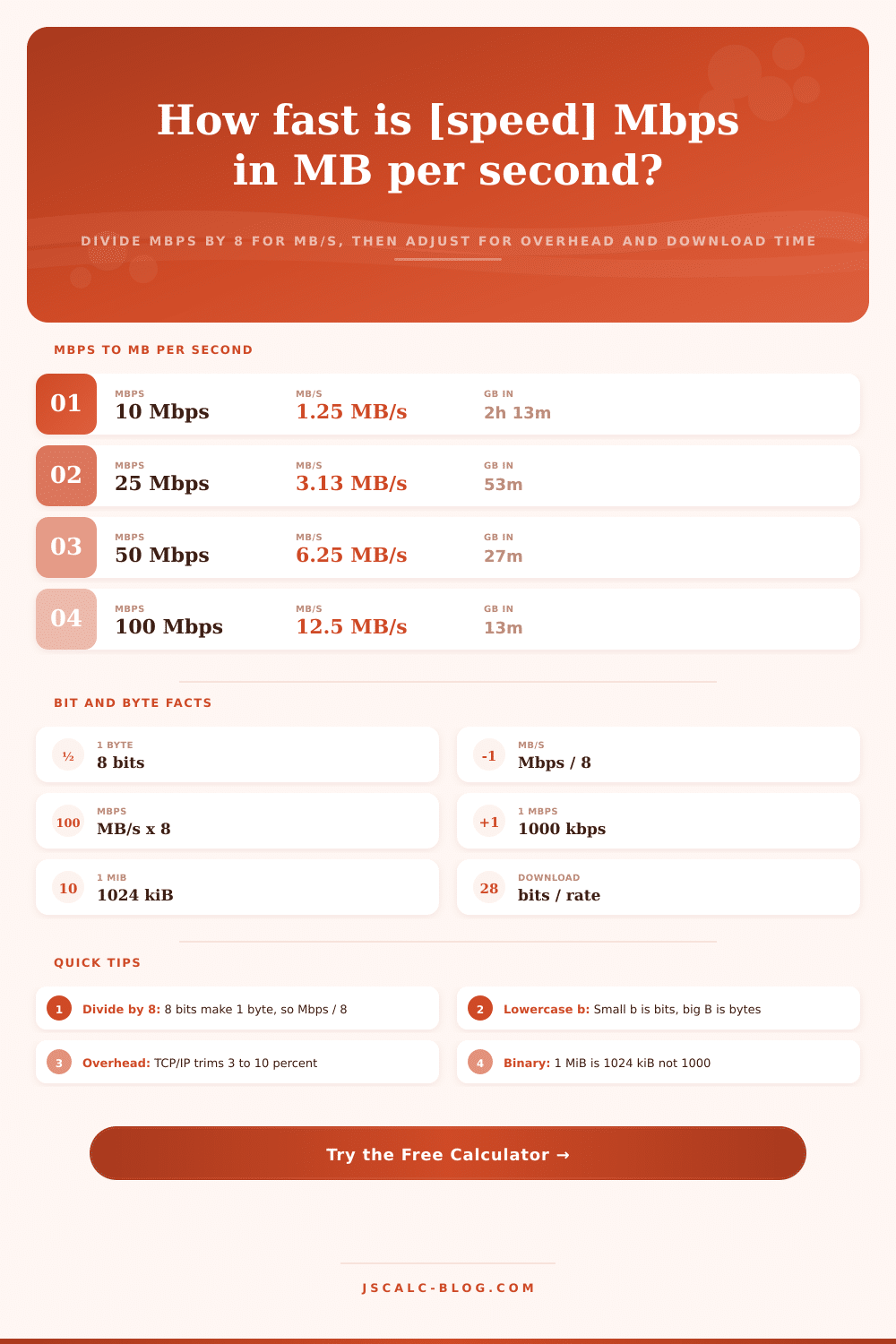
| Line Speed | MB/s (raw) | MB/s at 5% Overhead | 1 GB File Download |
|---|---|---|---|
| 1 Mbps | 0.125 MB/s | 0.119 MB/s | 2 h 21 min |
| 10 Mbps | 1.25 MB/s | 1.19 MB/s | 14 min 2 s |
| 25 Mbps | 3.125 MB/s | 2.97 MB/s | 5 min 37 s |
| 50 Mbps | 6.25 MB/s | 5.94 MB/s | 2 min 48 s |
| 100 Mbps | 12.5 MB/s | 11.88 MB/s | 1 min 24 s |
| 300 Mbps | 37.5 MB/s | 35.63 MB/s | 28 s |
| 500 Mbps | 62.5 MB/s | 59.38 MB/s | 17 s |
| 1000 Mbps | 125 MB/s | 118.75 MB/s | 8.4 s |
📊Common ISP Tiers Real-World Speeds
| Advertised Tier | MB/s Peak | 1 GB Update | 25 GB Game | 50 GB 4K Movie Set |
|---|---|---|---|---|
| 15 Mbps DSL | 1.88 MB/s | 9 min 22 s | 3 h 54 min | 7 h 48 min |
| 25 Mbps | 3.13 MB/s | 5 min 37 s | 2 h 20 min | 4 h 41 min |
| 100 Mbps | 12.5 MB/s | 1 min 24 s | 35 min 9 s | 1 h 10 min |
| 300 Mbps | 37.5 MB/s | 28 s | 11 min 43 s | 23 min 26 s |
| 500 Mbps | 62.5 MB/s | 17 s | 7 min 2 s | 14 min 4 s |
| 1 Gbps | 125 MB/s | 8.4 s | 3 min 31 s | 7 min 2 s |
| 2.5 Gbps | 312.5 MB/s | 3.4 s | 1 min 24 s | 2 min 49 s |
📐Bits vs Bytes and Decimal vs Binary
| Unit | Symbol | Measures | Equals |
|---|---|---|---|
| Bit | b | Data (rate) | Smallest unit, 0 or 1 |
| Byte | B | Data (size) | 8 bits |
| Kilobit | kbit | Rate | 1000 bits (decimal) |
| Kilobyte | kB | Size | 1000 bytes (decimal) |
| Kibibyte | kiB | Size | 1024 bytes (binary) |
| Megabyte | MB | Size | 1,000,000 bytes |
| Mebibyte | MiB | Size | 1,048,576 bytes |
| Gigabyte | GB | Size | 1000 MB (decimal) |
📡Connection Type Comparison Grid
| Technology | Typical Down Mbps | MB/s Down | Typical Latency | Typical Overhead | Best Use Case |
|---|---|---|---|---|---|
| Dial-up modem | 0.056 Mbps | 0.007 MB/s | 150 to 300 ms | 10 to 15% | Text email only |
| ADSL / DSL | 10 to 25 Mbps | 1.25 to 3.13 MB/s | 20 to 50 ms | 8 to 12% | Browsing, SD video |
| 4G LTE | 20 to 50 Mbps | 2.5 to 6.25 MB/s | 30 to 70 ms | 8 to 12% | Mobile HD streaming |
| Cable DOCSIS | 100 to 500 Mbps | 12.5 to 62.5 MB/s | 10 to 30 ms | 5 to 8% | 4K streaming, gaming |
| 5G mobile | 150 to 600 Mbps | 18.8 to 75 MB/s | 10 to 30 ms | 6 to 10% | Hotspot, mobile 4K |
| Fiber GPON | 300 to 1000 Mbps | 37.5 to 125 MB/s | 2 to 10 ms | 3 to 5% | Large downloads, work |
| Multi-gig fiber | 2000 to 10000 Mbps | 250 to 1250 MB/s | 1 to 5 ms | 3 to 5% | Servers, NAS, studios |
| Satellite LEO | 50 to 200 Mbps | 6.25 to 25 MB/s | 25 to 60 ms | 8 to 12% | Rural broadband |
⚙Formula Breakdown
💡Speed Math Tips
You have downloaded that movie four times and progress bar is still crawling. You check your bill and it clearly states you’re paying for a fast connection… and yet there’s no movement anywhere. It’s the classic internet speed disconnect.
Your provider claims megabits per second (lowercase b) and your computer reads off megabytes per second (uppercase B). Both look alike except one is eight times the other. A byte contains eight bits. Before you consider any other factors, those two values varies by a factor of eight. The page will help you see what’s really happening on your wire and convert cleanly in either direction.
How Bits and Bytes Are Different
That’s really the only rule about converting rates from one to another: a byte has eight bits in it. Bytes are what we display on our screens when we talk about file size and transfers; they’re what memory and storage is organized in. Network speeds is quoted in bits. These bits move one at a time over fiber or copper, so marketing a larger number can’t hurt anyone.
If you want to convert between bytes and bits, you divide (bytes) / 8 (bits/byte). So a 100 megabit per second connection tops out at 12.5 megabytes per second, and a gigabit line with 1000 megabits per second will top out at roughly 125 megabytes per second. Multiplying instead gets you back to the original value; if your download says it’s going 10 megabytes per second, then it’s flowing 80 megabits per second across the link. That’s the math that matters.
A single-letter-case difference between megabyte and megabit makes for some confusing numbers. Bits are lowercase, b; bytes are uppercase, B. That’s why Mbps and MB/s differ by a factor of eight. This is the same for kbps and kB/s, as well as Gbps and GB/s. If you see 400 somewhere as “my speed,” then ask if they’re talking 400 Mbps… A respectable 50 MB/s download; or 400 MB/s, which would be more like an enterprise level of bandwidth.
A file copy dialog will tell you MB/s, but speed test sites typicaly say Mbps because that’s what the plan is being sold as. Plug in whatever number you know with the calculator up top and stop wondering at what scale you’re operating.
The data rate increases by factors of 1,000. 1,000,000 bits per second = 1000 kilobits per second = 1 megabit per second. That’s the way networks work, based off this base-1000 SI standard, which is why you’ll never see “1024” for a bit rate on any network device. The converter honors that scale.
The confusing part continues with byte sizes. There are actually two systems: A decimal (base-10) system, where one MB is 1000 kB; and a binary system, where one MiB means 1024 KiB. Computer storage manufacturers sell using the decimal system, meaning a 1 TB drive contains a trillion bytes; however, your computer counts in binary and reports back as approximately 931 GiB. As drives gets bigger, the discrepancy becomes more pronounced.
The theoretical ceiling is to divide by eight. Reality doesn’t work that way. TCP/IP puts headers onto every packet, and packets has time to acknowledge each other. Additionally, the occasional byte gets lost and needs repeating. In combination these bits of network protocol overhead slice off a few to ten percent or so of the usable throughput depending on which tech you’re using. You can tweak the model’s loss setting to represent that. For example, if you set the overhead to five percent, a 12.5 MB/s raw cap becomes ~11.88 MB/s of actual sustained throughput.
That’s what people screw up. They think they are being screwed by their ISP when in fact they are simply shelling out for the unseen tax of packet framing.
Download time comes right after that. If you know the usable rate, then just divide the file size in bits by the rate in bits per second. To put it simply, the time in seconds = rate in bits/second ÷ file size in bits. You type in the file size and whatever units it’s in, and the tool shows you an estimate in terms of something human beings understand; from milliseconds to days. Since it defaults to usable rate minus overhead, the estimate will be reasonable. This is what everybody cares about. When will the backup or game finish downloading?
There’s a handy reference table on the page with common rates so you don’t have to do the math yourself if you want to see how it compares to your own experience.
There are three habits: divide Mbps by eight, choose if your bytes are in binary or decimal, and subtract overhead before concluding that something is slow. This gives you data rate literacy. It translates fuzzy frustration into crystal-clear expectations. The next time you’re picking between internet plans, sizing a backup window, or trying to settle a debate over what 400 really means, you’ll know the answer in no time and you’ll get it right.
You should of known that earlier. You stop watching the bar crawl and you start knowing when to pour yourself another cup of coffee.