Swap Space Size Calculator
Size Linux swap the right way. Enter your installed RAM, pick a distribution guideline such as RHEL or Ubuntu, and choose whether you need hibernation. The tool applies the RHEL tiered ratios and the Ubuntu square-root rule, adds RAM on top when hibernation is enabled, and reports recommended, minimum, and total virtual memory in gigabytes.
🐧Real Swap Sizing Presets
💾System and Swap Inputs
Physical memory installed on the machine.
Unit for the RAM value above.
Sets the base rule used for the recommendation.
Hibernation writes RAM to swap, so swap must hold all of RAM.
Database hosts often prefer smaller swap to avoid latency.
Drives the suggested swappiness value, not the size.
Compressed in-memory swap can reduce on-disk swap need.
Snaps the recommended swap to a tidy partition size.
🔢RHEL Rule Snapshot
📊RHEL Tiered Swap Guideline
| RAM Range | Swap (No Hibernation) | Swap (With Hibernation) | Notes |
|---|---|---|---|
| Less than 2 GB | 2 times RAM | 3 times RAM | Tiny systems need headroom |
| 2 GB to 8 GB | Equal to RAM | 2 times RAM | Balanced default |
| 8 GB to 64 GB | 0.5 times RAM | 1.5 times RAM | Minimum 4 GB swap |
| More than 64 GB | At least 4 GB | RAM plus 4 GB | Hibernation rarely used here |
🗄RAM to Swap Comparison Grid
| Installed RAM | RHEL Rule | Ubuntu Rule | With Hibernation | Total Virtual | Note |
|---|---|---|---|---|---|
| 2 GB | 4 GB | 1 GB | 4 GB | 6 GB | 2x tier applies |
| 4 GB | 4 GB | 2 GB | 8 GB | 12 GB | Equal to RAM |
| 8 GB | 8 GB | 3 GB | 16 GB | 24 GB | Boundary case |
| 16 GB | 8 GB | 4 GB | 24 GB | 40 GB | Half of RAM |
| 32 GB | 16 GB | 6 GB | 48 GB | 80 GB | Half of RAM |
| 64 GB | 32 GB | 8 GB | 96 GB | 160 GB | Half at top edge |
| 128 GB | 4 GB | 11 GB | 132 GB | 260 GB | 4 GB floor only |
🐞Ubuntu Square-Root Rule Examples
| RAM | sqrt(RAM) Swap | RAM + sqrt(RAM) Hibernate | Reads As |
|---|---|---|---|
| 1 GB | 1 GB | 2 GB | Round up small |
| 2 GB | 1 GB | 3 GB | sqrt 2 is 1.4 |
| 4 GB | 2 GB | 6 GB | Exact square |
| 8 GB | 3 GB | 11 GB | sqrt 8 is 2.8 |
| 16 GB | 4 GB | 20 GB | Exact square |
| 32 GB | 6 GB | 38 GB | sqrt 32 is 5.7 |
| 64 GB | 8 GB | 72 GB | Exact square |
| 128 GB | 11 GB | 139 GB | sqrt 128 is 11.3 |
🎛Swappiness by Storage and Role
| Scenario | Storage | Suggested swappiness | Why |
|---|---|---|---|
| Desktop | SSD or NVMe | 10 | Keep apps in RAM, spare flash |
| Desktop | Spinning HDD | 30 | Balance slow disk and RAM |
| General server | SSD or NVMe | 10 | Favor page cache |
| Database server | SSD or NVMe | 1 | Avoid swap latency spikes |
| Database server | Spinning HDD | 1 | Never swap hot pages |
| Low-RAM box with zram | Any | 100 | Compressed swap is fast |
⚙Formula Breakdown
💡Swap Tuning Tips
In just a few seconds, it looks at your installed RAM, uses it as a guide, checks if you use hibernation, and suggests your total, minimum, and recommended virtual memory amounts. In so doing, it removes guesswork and uses real-world distribution guidelines from distributions like Debian, SUSE, Ubuntu, and Red Hat. And it accommodates that special case: hibernation, which messes up the whole calculation.
Twice your RAM was good advice for a machine shipping with 512 megabytes of RAM, not for a server with 128 gigabytes.
How to Set Up Swap Space
Swap: The kernel allocate some disk space to use as an overflow for physical memory. As your RAM becomes full, the kernel dumps those least recently used memory page into swap. This frees up physical memory for things you are actively working on. It also allow the kernel to store less frequently used pages in swap while giving more RAM to its file cache. Everything speeds up.
However, because disk is much slower than memory, swap isn’t a substitute for RAM. But having a modest swap area act like a safety valve that prevents out-of-memory killer from abruptly killing any process when memory runs out.
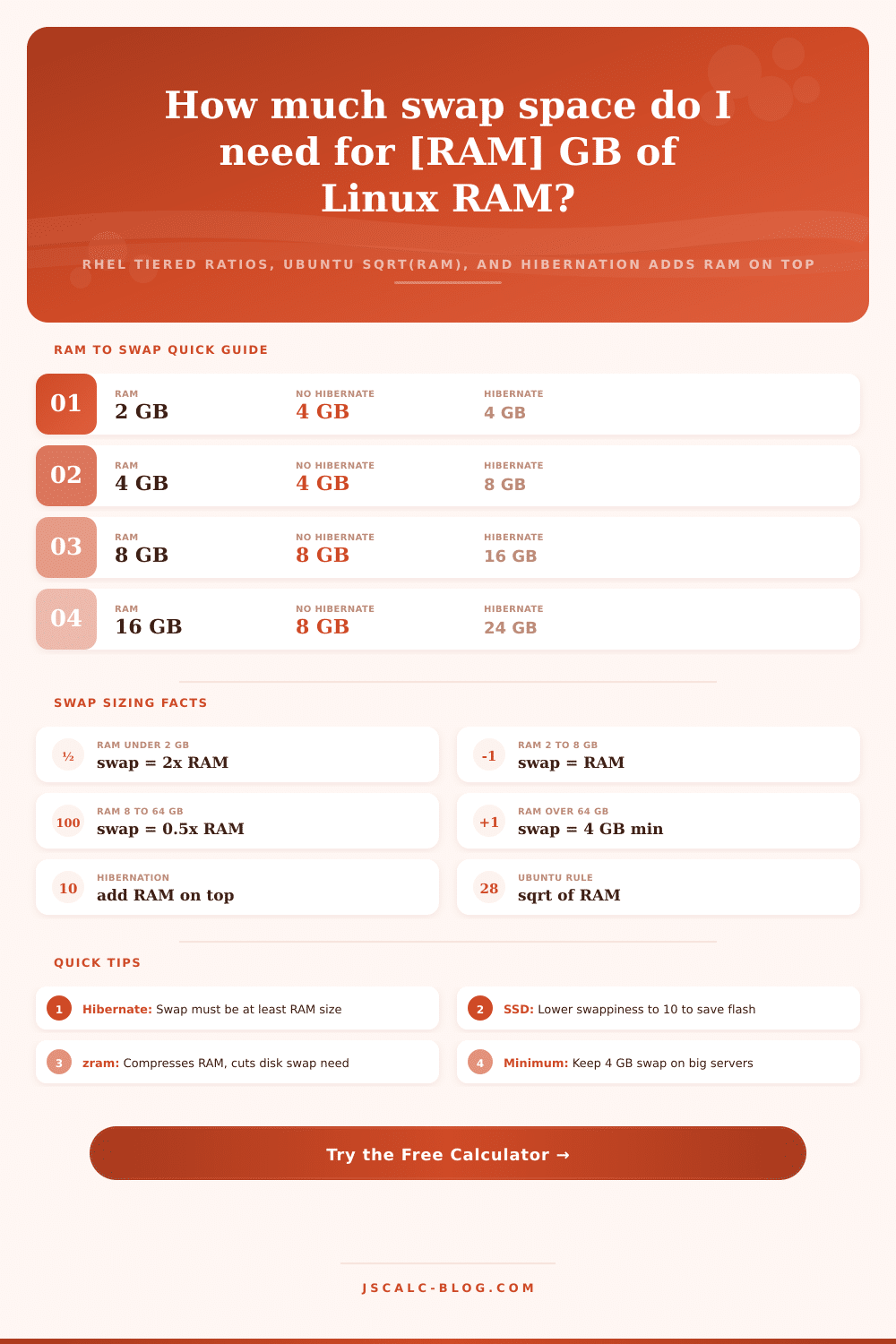
The official Red Hat Enterprise Linux guideline for swap space is published in levels where it adjusts the ratio downward with increasing RAM. If you have 2 gigabytes of RAM or less: 2x RAM is swap. Between 2 gigabytes and 8 gigabytes of RAM: RAM = swap. Between 8 gigabytes and 64 gigabytes of RAM: swap is set to half of your RAM with a 4 gigabyte floor. If you have more than 64 gigabytes of RAM, you are mostly paging out to disk anyway. Because of this, they recommend a 4 gigabyte floor.
In practice, these distros land pretty close to the same number. We used the same tiered calculation for Debian and SUSE in the swap calculator above.
Another lighter guideline from Ubuntu is the square root of your RAM. Swap should be approximately the square root of your RAM size, rounded up. For instance, a machine with 16 GB of RAM would use 4GB, and 64GB would use 8GB. On big machines, it generates lower levels of swap than the RHEL tiers do, which matches Ubuntu’s desktop-first assumption that it doesn’t need heavy paging if it has lots of RAM. The Ubuntu guideline sets the default formula to this kind of square-root approach, allowing you to see both philosophies side-by-side before committing to a set of partitions.
And then there’s hibernation. In hibernation, the whole contents of RAM are written out to the swap space (it’s called suspend-to-disk), and then the machine is powered down entirely. When you wake it up again, the kernel reads that image back into memory, restoring your session exactly. Your swap therefore has to be at least as big as your RAM, because the entire memory image must fit. So if you have a 16 gigabyte laptop, you need 16 gigabytes or more of swap. The RHEL paging level would just ask for 8 gigabytes of swap every day. How does it know? It takes the default recommendation and adds a complete copy of RAM on top of it when you turn on hibernation.
Swap profiles aren’t one size fits all. Database servers typically like a small amount of swap space with a low swappiness value. For the database role, the calculator reduces the base recommendation and says “Consider setting vm.swappiness=1.” This allows hot data pages to stay in RAM. It also avoids the latency spikes that swapping causes for query response times.
Storage type matters for tuning rather than sizing. Flash drives (NVMe and SSD) are recommended to have a swappiness of 10 to preserve their flash write endurance. Middle values strike a balance between memory pressure and slow seeks on spinning disks.
Nowadays, our moddern kernels also generate compressed swap which actualy resides within the physical RAM. Zswap acts as a compressed cache in front of your real swap device, while zram creates a block device backed by compressed memory. Both reduce the amount of writing to disk. If either is turned on the calculator notes it and increases the recommended swappiness towards 100. Writing to compressed RAM is cheap and fast.
For single-board computers such as a Raspberry Pi or small cloud instances, turning on zram is frequently more effective than creating a big swap file on disk.
The answer lies in three questions: how much RAM do you have? What is the distribution rule that best fits your system? Do you hibernate? Answer them and the sizes fit together.
Sizes vary based off how strict the distribution guidelines are: two times the RAM on small systems, or just a 4 gigabyte minimum on big servers. Add some more if you want to hibernate. Tune swappiness so it matches your workload and storage. Think about compressed swap on constrained systems. Use the presets as a starting point. Read the breakdown to see why.
In the end, you’ll wind up with a swap configuration that protects your system without wasting disk space.