Backup Storage Size Calculator
Size the target repository you need for a backup job from the source data volume, the backup scheme, the daily change rate, how many restore points you keep, and your compression and deduplication ratios. It reports total repository size, size per restore point, the effective reduction ratio, and how the raw protected data compares against the stored footprint.
🎯Real Repository Sizing Presets
💾Backup Job Inputs
Protected front-end data captured in a full backup.
Repository size is reported in this same unit.
Determines how the retention chain consumes storage.
Share of source that changes per day, drives increment size.
Weekly runs accumulate about seven days of change each.
Number of recovery points or days held in the chain.
Weekly grandfather fulls, used in GFS scheme only.
Archival monthly and yearly fulls, GFS scheme only.
Typical block compression is around 2:1 on mixed data.
Cross-restore-point dedup, often 5:1 to 20:1 on fulls.
🔢Sizing Snapshot
📋Increment Size by Change Rate
| Source Full | Daily Change | Increment Size | Reads As |
|---|---|---|---|
| 1 TB | 1% | 10 GB / day | Light database |
| 1 TB | 3% | 30 GB / day | Typical file server |
| 1 TB | 5% | 50 GB / day | Active VM estate |
| 1 TB | 10% | 100 GB / day | High-churn app |
| 500 GB | 2% | 10 GB / day | Small NAS share |
| 2 TB | 4% | 80 GB / day | Mixed workload |
| 10 TB | 1% | 100 GB / day | Large archive |
| 250 GB | 6% | 15 GB / day | Busy mailbox |
📊Compression and Dedup Reduction
| Compression | Dedup | Effective Ratio | 1 TB Logical Stores |
|---|---|---|---|
| 1:1 (off) | 1:1 (off) | 1.0:1 | 1024 GB |
| 2:1 | 1:1 | 2.0:1 | 512 GB |
| 2:1 | 4:1 | 8.0:1 | 128 GB |
| 2:1 | 10:1 | 20:1 | 51 GB |
| 3:1 | 5:1 | 15:1 | 68 GB |
| 2.5:1 | 8:1 | 20:1 | 51 GB |
| 1.5:1 | 3:1 | 4.5:1 | 228 GB |
| 3:1 | 20:1 | 60:1 | 17 GB |
🗃Backup Scheme Comparison Grid
| Scheme | What Each Run Stores | Logical Repo (1 TB, 3%, 30d) | Restore Speed | Dedup Benefit | Retention Behavior |
|---|---|---|---|---|---|
| Full only | Whole source every run | 30.0 TB | Fastest, one file | Very high, fulls repeat | Every point independent |
| Full + incremental | Changed blocks since prior run | 1.87 TB | Slower, replay chain | Moderate on increments | One broken link risks chain |
| Full + differential | All change since last full | ~14 TB | Medium, full plus one diff | Low, diffs overlap | Diffs grow until next full |
| Forever incremental | Increment, merged synthetic full | 1.87 TB | Fast from synthetic full | High with block dedup | Oldest merged forward |
| GFS | Daily inc plus tiered fulls | ~6.5 TB | Fast to any tier full | Very high across fulls | Daily, weekly, monthly, yearly |
| Synthetic weekly | Inc daily, synthetic full weekly | ~3.6 TB | Fast, weekly restore base | High on repeated fulls | Rolls weekly baselines |
🧭Repository Size by Retention Length
| Retention | Scheme | Logical Repo | Stored at 8:1 | Note |
|---|---|---|---|---|
| 7 days | Full + inc, 1 TB, 3% | 1.21 TB | 155 GB | Short cycle |
| 14 days | Full + inc, 1 TB, 3% | 1.42 TB | 182 GB | Two weeks |
| 30 days | Full + inc, 1 TB, 3% | 1.87 TB | 239 GB | Common target |
| 60 days | Fwd-inc, 1 TB, 3% | 2.77 TB | 354 GB | Two months |
| 90 days | Fwd-inc, 1 TB, 3% | 3.67 TB | 470 GB | One quarter |
| 1 year | GFS, 1 TB, 3% | ~8.4 TB | 1.05 TB | Compliance hold |
⚙Formula Breakdown
💡Repository Planning Tips
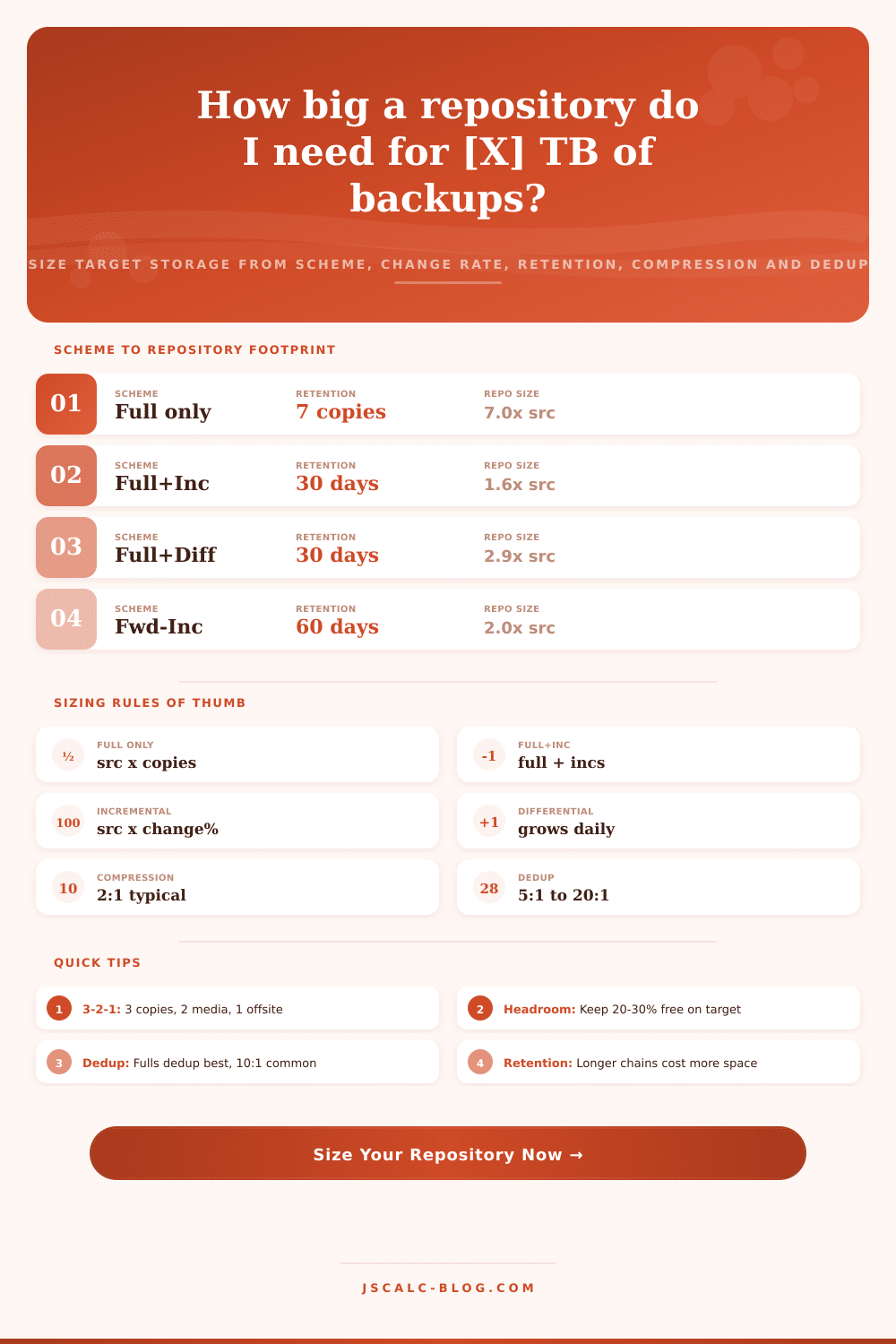
How big should my backup repo be? You need to answer that question when you do any kind of data protection. Most of us get it wrong. We have an idea of what we want to back up, but multiplying that by our retention period doesn’t always give you the total logical data size depending on the scheme you use. Other factors also matter. These include your daily change rate, how well dedupe and compression work, the number of restore points, and your scheme type. This calculator blends those together so you can estimate capacity ahead of purchasing disk and avoid the unpleasant surprise of filling a volume with a bunch of data from a synthetic full merge.
There’s also a common misunderstanding between storage size and data size. Many believe if they have 1 TB of data to protect, they need 1 TB of storage for their backups. In fact, the repository contains a series of restore points (also called a chain). Depending how large that chain grows, it could contain multiple times the size of a single full backup. For example, with a full-only scheme retaining seven days’ worth of data, it will hold seven times as much data as its source prior to compression. An efficient incremental chain will create another delta for every day you keep it. So this retention chain affects the repository footprint. Deduplication and compression come after and shrink the number being stored; which is where many people get tripped up in the math.
How to Calculate Backup Size
The biggest impact comes from your chosen scheme. If you use a full-only strategy, each full copy contains most of the same blocks, which makes them easy to restore and helps with deduplication. But its logical footprint will equal source size times copies. A full plus incremental strategy writes one complete backup first, and then only the changed blocks after that. On a 1 TB source with 3 percent daily change, that’s an additional ~30 GB/day instead of another terabyte. Synthetic-full or forever-incremental schemes merge earlier increments forward. This yields a small daily change like the one above, but still provides fast restores without reading the entire source again.
It is not like differentials. A differential represents all the blocks that have changed since your last full backup. So they grow over time (until cleared by another full), and require increasing amounts of storage each day. Because differentials overlap, a second one covers everything covered by the first… A single differential chain takes up more space then a similar-length incrementally chained chain. The calculator adds them up, one growing series per day.
An example using a grandchild, grandparent, and parent is layered with a daily chain underneath full backups kept at weekly, monthly, and yearly intervals. It includes both the daily chain plus any full backups you keep for long term compliance.
The weight of the chain is driven by two things: How much changes each day (the change rate), and how many points you retain (retention count). The change rate becomes your increment size directly; it’s the source times the percentage of blocks that change per day. An active virtual machine estate may churn at 5 to 10 percent a day. A quiet archive might be more like 1 percent.
Retention grows this amount for every point you keep. Every time you double retention, the part of your repository that’s increasing in the increment roughly doubles as well. If your forever-incremental job runs to 30 days, then doubling that to 90 days shifts the logical total from something closer to 1.87 TB to 3.67 TB, even though the source remains the same.
Knowing that we have a logical storage area, there are two reduction factors to determine exactly what winds up on disk. First, compression squishes down each block by about 2:1 on mixed data. Data like text and databases tend to compress well; pre-compressed media tends not to. Second, deduplication strips out duplicate blocks within any restore point. Since full backups repeat the same blocks over and over, those are best for dedup. The calculator takes the product of the two ratios to give you your effective reduction. If you’re using both 2:1 compression and 4:1 dedup, that’s an overall ratio of 8:1. That means that 1.87 TB of logical data will be stored in about 239 GB.
The results panel displays the effective ratio. It also shows how much raw data versus how much was stored. Four numbers back out of every calculation. Stored Footprint is the actual space required in the target after dedup and compression; this is what you need to provision. Restore Point Size is the average amount of data restored from each point. This is an entire copy after compressing for full-only, or a small amount for incremental schemes. Effective Reduction Ratio shows the combined effect of deduplication and compression, meaning how much they both work together to reduce data. Raw-versus-Stored Card measures the savings between physical space and logical protected data. And finally there’s a list of formulas broken down line-by-line with the number substitutions so you can audit the estimate yourself.
But capacity planning doesn’t stop at the raw repository number. According to the 3-2-1 rule, you should have three copies of your data on two different types of media with one stored offsite. This means the footprint you size here is likely replicated between your primary and secondary (or cloud) target. And each repository requires some free headroom, typically 20 to 30 percent. Because retention overlaps, synthetic full merges and sudden change spikes don’t leave you with zero free space. When you size tight, you get failed backup jobs. Size with margin and they keep running.
To get started quickly, just load up the closest-to-you preset that matches your workload. Tweak the retention, rate and source size to reflect your own environment. Observe as the stored footprint and logical total change to match your tuning of both deduplication ratio and scheme. For a fair apples-to-apples comparison across schemes, use the comparison grid to balance space against restore speed. Dedup ratios depend heavily on the data type; run the numbers at a conservative ratio then again optimistic to find the range of the amount of capacity needed. Add in 3-2-1 and healthy headroom, and now you have a defensible number for buying storage. It is always better to over-buy disk early rather than scrambling when the target fills up and causes the backup job to fail.
How big should my backup repo be? You need to answer that question when you do any kind of data protection. Most of us get it wrong. We have an idea of what we want to back up, but multiplying that by our retention period doesn’t always give you the total logical data size depending on the scheme you use. Other factors also matter. These include your daily change rate, how well dedupe and compression work, the number of restore points, and your scheme type. This calculator blends those together so you can estimate capacity ahead of purchasing disk and avoid the unpleasant surprise of filling a volume with a bunch of data from a synthetic full merge.
There’s also a common misunderstanding between storage size and data size. Many believe if they have 1 TB of data to protect, they need 1 TB of storage for their backups. In fact, the repository contains a series of restore points (also called a chain). Depending how large that chain grows, it could contain multiple times the size of a single full backup. For example, with a full-only scheme retaining seven days’ worth of data, it will hold seven times as much data as its source prior to compression. An efficient incremental chain will create another delta for every day you keep it. So this retention chain affects the repository footprint. Deduplication and compression come after and shrink the number being stored, which is where many people get tripped up in the math.
The biggest impact comes from your chosen scheme. If you use a full-only strategy, each full copy contains most of the same blocks, which makes them easy to restore and helps with deduplication. But its logical footprint will equal source size times copies. A full plus incremental strategy writes one complete backup first, and then only the changed blocks after that. On a 1 TB source with 3 percent daily change, that’s an additional ~30 GB/day instead of another terabyte. Synthetic-full or forever-incremental schemes merge earlier increments forward. This yields a small daily change like the one above, but still provides fast restores without reading the entire source again.
It is not like differentials. A differential represents all the blocks that have changed since your last full backup. So they grow over time (until cleared by another full), and require increasing amounts of storage each day. Because differentials overlap; a second one covers everything covered by the first, a single differential chain takes up more space then a similar-length incrementally chained chain. The calculator adds them up, one growing series per day.
An example using a grandchild, grandparent, and parent is layered with a daily chain underneath full backups kept at weekly, monthly, and yearly intervals. It includes both the daily chain plus any full backups you keep for long term compliance.
The weight of the chain is driven by two things: How much changes each day (the change rate), and how many points you retain (retention count). The change rate becomes your increment size directly; it’s the source times the percentage of blocks that change per day. An active virtual machine estate may churn at 5 to 10 percent a day. A quiet archive might be more like 1 percent.
Retention grows this amount for every point you keep. Every time you double retention, the part of your repository that’s increasing in the increment roughly doubles as well. If your forever-incremental job runs to 30 days, then doubling that to 90 days shifts the logical total from something closer to 1.87 TB to 3.67 TB, even though the source remains the same.
Knowing that we have a logical storage area, there are two reduction factors to determine exactly what winds up on disk. First, compression squishes down each block by about 2:1 on mixed data. Data like text and databases tend to compress well; pre-compressed media tends not to. Second, deduplication strips out duplicate blocks within any restore point. Since full backups repeat the same blocks over and over, those are best for dedup. The calculator takes the product of the two ratios to give you your effective reduction. If you’re using both 2:1 compression and 4:1 dedup, that’s an overall ratio of 8:1. That means that 1.87 TB of logical data will be stored in about 239 GB.
The results panel displays the effective ratio. It also shows how much raw data versus how much was stored. Four numbers back out of every calculation. Stored Footprint is the actual space required in the target after dedup and compression; this is what you need to provision. Restore Point Size is the average amount of data restored from each point. This is an entire copy after compressing for full-only, or a small amount for incremental schemes. Effective Reduction Ratio shows the combined effect of deduplication and compression, meaning how much they both work together to reduce data. Raw-versus-Stored Card measures the savings between physical space and logical protected data. And finally there’s a list of formulas broken down line-by-line with the number substitutions so you can audit the estimate yourself.
But capacity planning doesn’t stop at the raw repository number. According to the 3-2-1 rule, you should have three copies of your data on two different types of media with one stored offsite. This means the footprint you size here is likely replicated between your primary and secondary (or cloud) target. And each repository requires some free headroom, typically 20 to 30 percent. Because retention overlaps, synthetic full merges and sudden change spikes don’t leave you with zero free space. When you size tight, you get failed backup jobs. Size with margin and they keep running.
To get started quickly, just load up the closest-to-you preset that matches your workload. Tweak the retention, rate and source size to reflect your own environment. Observe as the stored footprint and logical total change to match your tuning of both deduplication ratio and scheme. For a fair apples-to-apples comparison across schemes, use the comparison grid to balance space against restore speed. Dedup ratios depend heavily on the data type; run the numbers at a conservative ratio then again optimistic to find the range of the amount of capacity needed. Add in 3-2-1 and healthy headroom, and now you have a defensible number for buying storage. It is always better to over-buy disk early rather than scrambling when the target fills up and causes the backup job to fail.
How big should my backup repo be? You need to answer that question when you do any kind of data protection. Most of us get it wrong. We have an idea of what we want to back up, but multiplying that by our retention period doesn’t always give you the total logical data size depending on the scheme you use. Other factors also matter. These include your daily change rate, how well dedupe and compression work, the number of restore points, and your scheme type. This calculator blends those together so you can estimate capacity ahead of purchasing disk and avoid the unpleasant surprise of filling a volume with a bunch of data from a synthetic full merge.
There’s also a common misunderstanding between storage size and data size. Many believe if they have 1 TB of data to protect, they need 1 TB of storage for their backups. In fact, the repository contains a series of restore points (also called a chain). Depending how large that chain grows, it could contain multiple times the size of a single full backup. For example, with a full-only scheme retaining seven days’ worth of data, it will hold seven times as much data as its source prior to compression. An efficient incremental chain will create another delta for every day you keep it. So this retention chain affects the repository footprint. Deduplication and compression come after and shrink the number being stored… Which is where many people get tripped up in the math.
The biggest impact comes from your chosen scheme. If you use a full-only strategy, each full copy contains most of the same blocks, which makes them easy to restore and helps with deduplication. But its logical footprint will equal source size times copies. A full plus incremental strategy writes one complete backup first, and then only the changed blocks after that. On a 1 TB source with 3 percent daily change, that’s an additional ~30 GB/day instead of another terabyte. Synthetic-full or forever-incremental schemes merge earlier increments forward. This yields a small daily change like the one above, but still provides fast restores without reading the entire source again.
It is not like differentials. A differential represents all the blocks that have changed since your last full backup. So they grow over time (until cleared by another full), and require increasing amounts of storage each day. Because differentials overlap, a second one covers everything covered by the first; a single differential chain takes up more space then a similar-length incrementally chained chain. The calculator adds them up, one growing series per day.
An example using a grandchild, grandparent, and parent is layered with a daily chain underneath full backups kept at weekly, monthly, and yearly intervals. It includes both the daily chain plus any full backups you keep for long term compliance.
The weight of the chain is driven by two things: How much changes each day (the change rate), and how many points you retain (retention count). The change rate becomes your increment size directly; it’s the source times the percentage of blocks that change per day. An active virtual machine estate may churn at 5 to 10 percent a day. A quiet archive might be more like 1 percent.
Retention grows this amount for every point you keep. Every time you double retention, the part of your repository that’s increasing in the increment roughly doubles as well. If your forever-incremental job runs to 30 days, then doubling that to 90 days shifts the logical total from something closer to 1.87 TB to 3.67 TB, even though the source remains the same.
Knowing that we have a logical storage area, there are two reduction factors to determine exactly what winds up on disk. First, compression squishes down each block by about 2:1 on mixed data. Data like text and databases tend to compress well; pre-compressed media tends not to. Second, deduplication strips out duplicate blocks within any restore point. Since full backups repeat the same blocks over and over, those are best for dedup. The calculator takes the product of the two ratios to give you your effective reduction. If you’re using both 2:1 compression and 4:1 dedup, that’s an overall ratio of 8:1. That means that 1.87 TB of logical data will be stored in about 239 GB.
The results panel displays the effective ratio. It also shows how much raw data versus how much was stored. Four numbers back out of every calculation. Stored Footprint is the actual space required in the target after dedup and compression; this is what you need to provision. Restore Point Size is the average amount of data restored from each point. This is an entire copy after compressing for full-only, or a small amount for incremental schemes. Effective Reduction Ratio shows the combined effect of deduplication and compression, meaning how much they both work together to reduce data. Raw-versus-Stored Card measures the savings between physical space and logical protected data. And finally there’s a list of formulas broken down line-by-line with the number substitutions so you can audit the estimate yourself.
But capacity planning doesn’t stop at the raw repository number. According to the 3-2-1 rule, you should have three copies of your data on two different types of media with one stored offsite. This means the footprint you size here is likely replicated between your primary and secondary (or cloud) target. And each repository requires some free headroom, typically 20 to 30 percent. Because retention overlaps, synthetic full merges and sudden change spikes don’t leave you with zero free space. When you size tight, you get failed backup jobs. Size with margin and they keep running.
To get started quickly, just load up the closest-to-you preset that matches your workload. Tweak the retention, rate and source size to reflect your own environment. Observe as the stored footprint and logical total change to match your tuning of both deduplication ratio and scheme. For a fair apples-to-apples comparison across schemes, use the comparison grid to balance space against restore speed. Dedup ratios depend heavily on the data type; run the numbers at a conservative ratio then again optimistic to find the range of the amount of capacity needed. Add in 3-2-1 and healthy headroom, and now you have a defensible number for buying storage. It is always better to over-buy disk early rather than scrambling when the target fills up and causes the backup job to fail.
How big should my backup repo be? You need to answer that question when you do any kind of data protection. Most of us get it wrong. We have an idea of what we want to back up, but multiplying that by our retention period doesn’t always give you the total logical data size depending on the scheme you use. Other factors also matter. These include your daily change rate, how well dedupe and compression work, the number of restore points, and your scheme type. This calculator blends those together so you can estimate capacity ahead of purchasing disk and avoid the unpleasant surprise of filling a volume with a bunch of data from a synthetic full merge.
There’s also a common misunderstanding between storage size and data size. Many believe if they have 1 TB of data to protect, they need 1 TB of storage for their backups. In fact, the repository contains a series of restore points (also called a chain). Depending how large that chain grows, it could contain multiple times the size of a single full backup. For example, with a full-only scheme retaining seven days’ worth of data, it will hold seven times as much data as its source prior to compression. An efficient incremental chain will create another delta for every day you keep it. So this retention chain affects the repository footprint. Deduplication and compression come after and shrink the number being stored, which is where many people get tripped up in the math.
The biggest impact comes from your chosen scheme. If you use a full-only strategy, each full copy contains most of the same blocks, which makes them easy to restore and helps with deduplication. But its logical footprint will equal source size times copies. A full plus incremental strategy writes one complete backup first, and then only the changed blocks after that. On a 1 TB source with 3 percent daily change, that’s an additional ~30 GB/day instead of another terabyte. Synthetic-full or forever-incremental schemes merge earlier increments forward. This yields a small daily change like the one above, but still provides fast restores without reading the entire source again.
It is not like differentials. A differential represents all the blocks that have changed since your last full backup. So they grow over time (until cleared by another full), and require increasing amounts of storage each day. Because differentials overlap, a second one covers everything covered by the first, a single differential chain takes up more space then a similar-length incrementally chained chain. The calculator adds them up, one growing series per day.
An example using a grandchild, grandparent, and parent is layered with a daily chain underneath full backups kept at weekly, monthly, and yearly intervals. It includes both the daily chain plus any full backups you keep for long term compliance.