Adaptive Sync Range Calculator
Enter your FreeSync or G-Sync refresh window and current frame rate to find the VRR window width, whether the panel is Low Framerate Compensation capable when the maximum is at least double the minimum, the LFC frame multiplier below the range, and the ideal in-game frame cap that keeps you tear-free and low-latency.
🎯Monitor and Frame Rate Presets
🖥Adaptive Sync Inputs
Lowest refresh the panel can sync, from your spec sheet.
Top of the adaptive sync window, usually the panel max.
The frame rate your GPU is producing right now.
Certification affects guaranteed LFC and low-fps behavior.
Ratio of max to min required before LFC can engage.
VSync catches frames that exceed the VRR ceiling.
How much headroom to leave below the VRR ceiling.
Controls decimals shown on refresh figures.
🔢Formula Snapshot
📊VRR Window vs LFC Support
| Refresh Range | Window Width | Max / Min Ratio | LFC Capable |
|---|---|---|---|
| 48 - 60 Hz | 12 Hz | 1.25x | No |
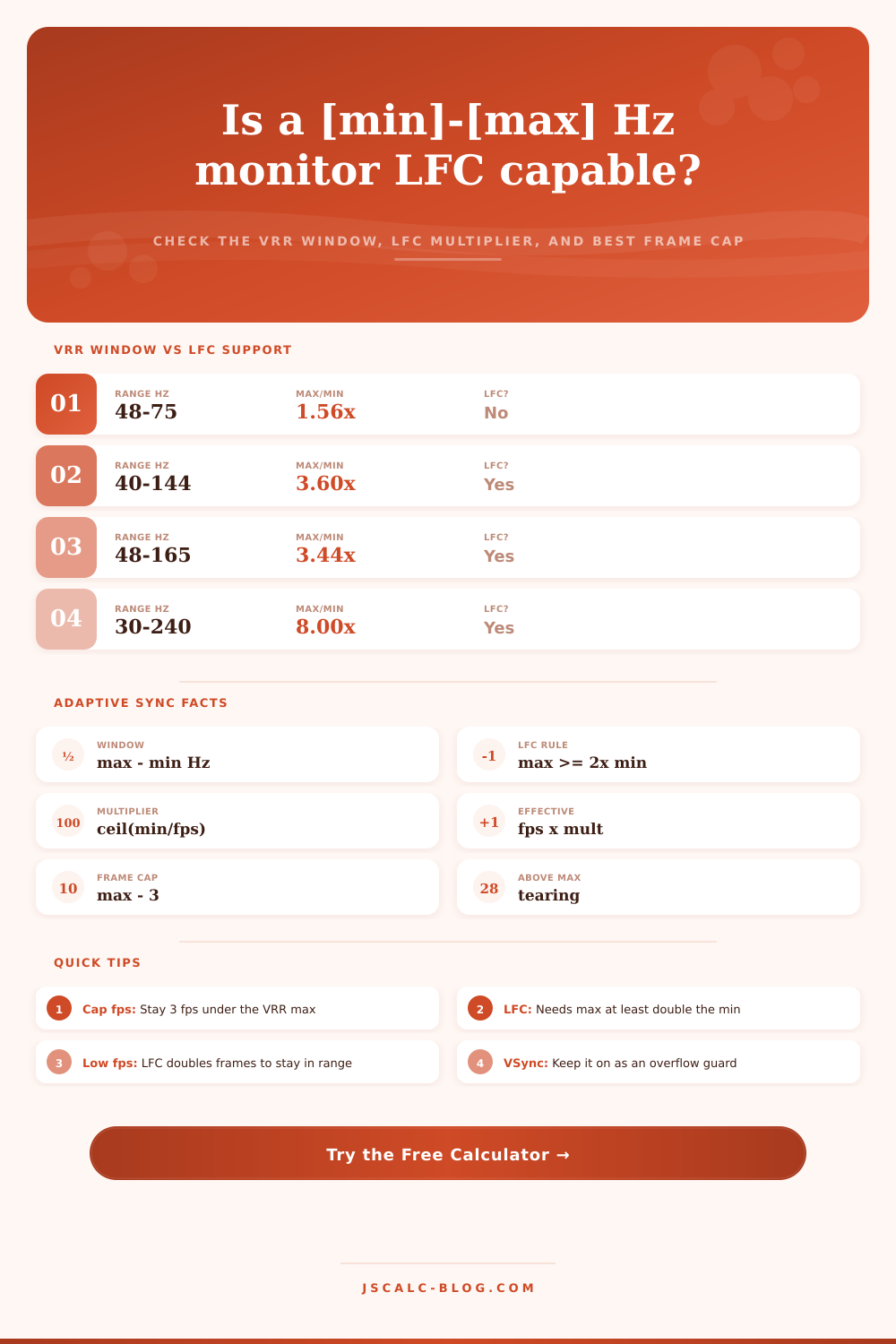
| 48 - 75 Hz | 27 Hz | 1.56x | No |
| 55 - 75 Hz | 20 Hz | 1.36x | No |
| 48 - 100 Hz | 52 Hz | 2.08x | Yes |
| 60 - 144 Hz | 84 Hz | 2.40x | Yes |
| 40 - 144 Hz | 104 Hz | 3.60x | Yes |
| 48 - 165 Hz | 117 Hz | 3.44x | Yes |
| 30 - 240 Hz | 210 Hz | 8.00x | Yes |
🔁LFC Frame Multiplier Below the Minimum
| fps Below Min | Min = 40 Hz | Multiplier ceil(min/fps) | Effective Refresh | Result |
|---|---|---|---|---|
| 38 fps | 40 Hz | 2x | 76 Hz | Back in range |
| 30 fps | 40 Hz | 2x | 60 Hz | Back in range |
| 25 fps | 40 Hz | 2x | 50 Hz | Back in range |
| 20 fps | 40 Hz | 2x | 40 Hz | At the edge |
| 18 fps | 40 Hz | 3x | 54 Hz | Back in range |
| 13 fps | 40 Hz | 4x | 52 Hz | Back in range |
| 10 fps | 40 Hz | 4x | 40 Hz | At the edge |
🖥Monitor Class Comparison Grid
| Monitor Class | VRR Min | VRR Max | LFC? (Max/Min) | Frame Cap | Notes |
|---|---|---|---|---|---|
| Budget office 1080p | 48 Hz | 75 Hz | No (1.56x) | 72 fps | Narrow window, stutters under 48 |
| Value 1440p IPS | 40 Hz | 144 Hz | Yes (3.60x) | 141 fps | Wide range, strong LFC |
| Gaming 1440p | 48 Hz | 165 Hz | Yes (3.44x) | 162 fps | Common FreeSync Premium spec |
| OLED high refresh | 30 Hz | 240 Hz | Yes (8.00x) | 237 fps | Very wide, deep LFC headroom |
| G-Sync module 1440p | 1 Hz | 240 Hz | Yes (240x) | 237 fps | Hardware module, no lower floor |
| Console TV (HDMI 2.1) | 40 Hz | 120 Hz | Yes (3.00x) | 117 fps | VRR for PS5 and Xbox Series |
| Ultrawide 1440p | 48 Hz | 175 Hz | Yes (3.65x) | 172 fps | 21:9 FreeSync Premium Pro |
| Esports 1080p | 30 Hz | 360 Hz | Yes (12.0x) | 357 fps | Massive window for fast fps |
🛠Sync Technology Reference
| Technology | Guaranteed LFC | Typical Floor | Note |
|---|---|---|---|
| FreeSync (base) | Not required | 48 Hz | Range varies by panel |
| FreeSync Premium | Required | Down to 48 Hz | Mandatory LFC above 120 Hz max |
| G-Sync (module) | Built in | 1 Hz | Hardware frame doubling |
| G-Sync Compatible | Panel dependent | 48 Hz | Validated FreeSync panels |
| VESA AdaptiveSync | Certified tiers | Varies | MediaSync and AdaptiveSync logos |
⚙Formula Breakdown
💡Adaptive Sync Setup Tips
There are two number on the spec sheet for your monitor. They sound close, yet they represent different things. The first is the highest refresh rate listed (say two-hundred forty or one-hundred sixty-five). The second is buried in the fine print, lower (like forty- or thirty) and represents the lowest refresh rate.
Because higher is better, most consumers only pay attention to the first one. But doing so overlooks what adaptive sync actualy does, it’s not just about smoothness. It’s about negotiation between the monitor and your graphics card inside of a certain bandwidth window.
Why Your Monitor’s Refresh Rate Range Matters More Than the Top Number
If you’re out of that window, you’ll have tearing or stutter, no matter how much money you spend on screen. For day-to-day comfort, it’s not the maximum speed but rather the width of that window. Most real-world situation will fall within a range of forty to one-hundred forty-four hertz.
You have breathing room if a particularly intense moment in a game drop you down into slow motion. By comparison, a lower-cost panel that operates between forty-eight and seventy-five hertz might seem like plenty, but then you see how tight the range is. There are roughly thirty hertz worth of playability. Drop even a few frame under forty-eight, and you’re thrown out of sync. That little bit makes all the difference between feeling of fluidity and a jagged, compromised experience in a pinch.
So what about Low Framerate Compensation (LFC), which kicks in when you’re dropping frames and will serve as a safety net? There are some hard-and-fast rules here: First, LFC requires that your max frame rate must be at least twice your min frame rate. Why? Because LFC doubles each frame. In other words, it’s pretending that 30 frames per second is 60 hertz.
When your frame rate is high enough, it won’t even kick on; it’s only a backstop for dips in performance. Seventy-five is not twice forty-eight. A monitor with a 48-75 hz panel doesn’t pass muster. Forty hertz to a hundred forty-four does. Smooth as silk.
The way that this works is that when LFC turns on it will repeat frames according to a multiplier. So let’s say you’re running in twenty-five frames per second on a display with a forty-eight hertz floor. Your system would double those frames so it’s effectively running at fifty hertz, keeping you just within the window without tearing. As your performance slips further the multiplier goes up, increasing to three or four times. It’s all about maintaining the effective refresh rate higher then the minimum limit.
Knowing the math lets you know if it’s worth dropping the money on a display for what your hardware can handle. On the other end of the spectrum, going over your monitor’s max refresh rate creates issues of its own. Without VSync enabled, when your graphics card outputs more frames than the monitor can display, you’ll experience screen tearing.
VSync prevents tearing, but it also introduces a bit of input lag as it buffers the next few frame. For the best-looking results, simply set your in-game frame rate three or five frames under max refresh limit. This keeps you within that variable range while avoiding any sort of visual glitch (tearing) or latency penalty (VSync).
But knowing those limits is more important than seeking the highest possible number when choosing the best screen for you. Is it better to have a wider adaptive window or a high ceiling but a narrower band? A wider adaptive window will deal with variable frame rate input more effectivly than a higher ceiling, which only has a narrower band.
You don’t need a monitor that expects perfection out of your system. You need something that’ll adapt to yours. That’s why checking how many hertz are actualy used is important. Knowing the max/min refresh rate ratio will help guide your decision.
You should of also cap your frames wisely so that all those hertz go towards making games feel smoother instead of simply looking good on the box.